For input in voicetracking (VT) I use the output from my mixing console.
It records but when playing the VT it’s sounds very bad, like a robot voice, seams to be a bit slower also.
When I records the same way in another program (Adobe) the sound is great.
Checked all the freq. and are all on 48000 (tested 41000 also)
Can someone help please ? after 10 ours testing and checking I’m stuck
Hi, this requires information at least about your setup (is there a mixing console?), the wiring, and a screenshot of your Audio routing (record as well as playback).
I already mentioned that I use a mixing console, the output is going to the (USB) soundcard input for now. With the onboard soundcard I have the same problem en disabled this one in the bios.
What I just find out is that the mAirlist configurator doe snot safe my settings when I ajust things..
In the stand alone configurator the routing is different as the configaurator in the main program..
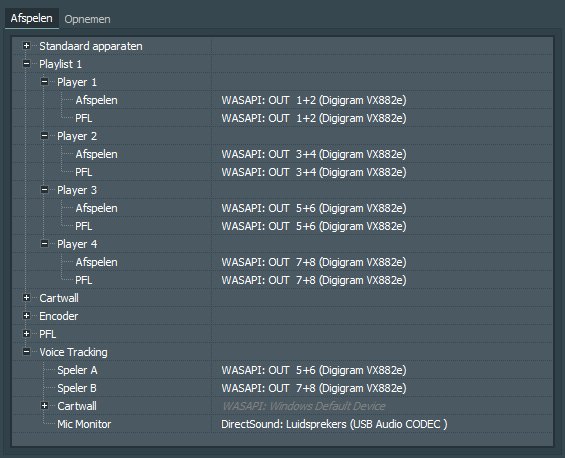
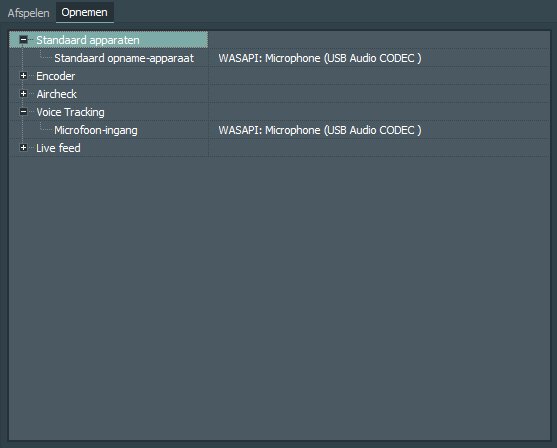
Attached the play en record setting in the main program.
Routing playback and PFL on the same channel never is a good idea. (This as a general hint, the routing experts to the fore, please.) So how about the wiring? Why is the microphone connected to some USB audio codec and not to the mixer?
The micro is connected to the mixer, the mixer goes to the line in from the USB audio device.
Using the same channels I understand, but I don’t use the players 1,2, 3,4 when I use the voictrack funtion
Difficult routing but it works well in the old studio (with an older PC)
First of all, as a general hint, please don’t use DirectSound. Even not mixed up with WASAPI. mAirList recommends the usage of WASAPI all over the Audio Routing.
When you mention the control panel right out of the playout: Normally (standard) all changes of the control panel are saved as a configuration setting. You can disable this option in the configuration. Please check this.
If this is not caused by the (not) saving option from the control panel: Is version 8 the only mAirList version on your computer or is there an earlier one in addition?
I found what I was my mistake…
Last week wen I was building this new studio I updated to version 8, that’s fine but in the taskbar was still the version 7 icon… Sorry for that !
Thanks for the help, going to sleep now, will post a picture of the home studio desk tomorrow.
That was one of my thoughts, which I didn’t want to bring up first. During the upgrade, the taskbar links are not automatically updated. This is also the case with other programmes if the linked path is not overwritten. mAirList gets a new directory with each new major version.
Thank you for your feedback and best of luck with your new home studio desk.
I’m afraid I think I didn’ get the point: You’ve had a wrong menu bar and that made the sound distorted?! Sorry, but that seems less than unlikely to me.
I guess he did the changes on Version 8, launching control panel from the Windows Start menu but later launched mAirlist 7 from the pinned Task Bar Icon, so what ever was changed can’t have any effect.
The explanation is that every time I change my devices and saved them, they are saved in version 8 but I started version 7 and there where no changes made, The input device for VT was wrong each time.