What do I have to save as .mlp?
When I want to export the Advertising settings, it is always exported as JSON.
There I see:
“Blocks”: [
{
“RegionCount”: 0,
“Closer”: “”,
“ImportBlockNumber”: 1,
“Name”: “”,
“ContainerColor”: “#FFFF00”,
“ProjectedTime”: “00:00:00”,
“AliasNumber”: 1,
“Inliner”: “”,
“AlwaysContainer”: true,
“ContainerArtist”: “Advertising”,
“Source”: 1,
“Opener”: “”,
“ContainerAutoFillMethod”: “None”,
“ContainerItemType”: “Advertising”,
“ContainerTitle”: “PUB-1”,
“ContainerFiller”: “”
},
{
“RegionCount”: 0,
“Closer”: “”,
“ImportBlockNumber”: 2,
“Name”: “”,
“ContainerColor”: “#FFFF00”,
“ProjectedTime”: “00:00:00”,
“AliasNumber”: 2,
“Inliner”: “”,
“AlwaysContainer”: true,
“ContainerArtist”: “Advertising”,
“Source”: 1,
“Opener”: “”,
“ContainerAutoFillMethod”: “None”,
“ContainerItemType”: “Advertising”,
“ContainerTitle”: “PUB-2”,
“ContainerFiller”: “”
}
]
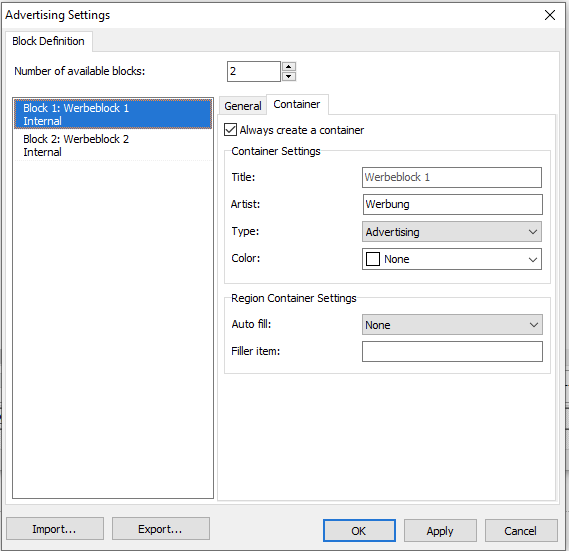
My advertising containers are exactly like on your screenprint. “Always create a container” is checked.
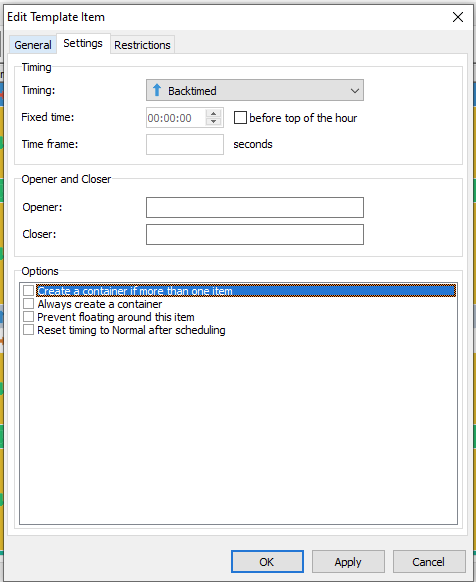
But in the Edit Template Item screen, I have unchecked “Create a container if more than one item” , but “Always create a container” is checked.