It may have been covered previously, but I haven’t been able to find a similar issue,
We generate our playlists for the week every Wednesday evening, with an advertising container currently at the top of the hour. From the Wiki I have selected “Always create container”, and would like to be able to update advertising containers on load/via event after top of the hour playlist load.
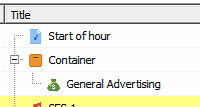
Which generates the below advertising container in a Container:
If i choose “Update Advertising” in any location, DB, playlist, etc, it tells me 0 containers scanned, 0 containers updated.
I have tested by turning off the “Always create container” and regenerating the playlist for that hour and then was able to successfully update the advertising container, but how would that work if there was no advertising when the playlists were initially generated? would it create the advertising slot as an empty in the playlist if the “always create container” is not selected??
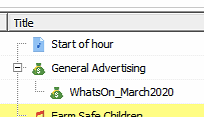
Below if i move the “Advertising container” outside of the automatically generated container, the update works…
Any possibility for adding an option to enable advertising updates for advertising blocks within a container in mAirlist v8?
We want to run a post-processing script that places the TOTH, Advertising Block, News & Jingle within a single container, so it can easily be moved within the playlist.
Thanks to the fact that mAirlist has such an amazingly powerful scripting engine, I was able to solve this with a simple script.
The hardest part was figuring out how to check that a playlist item is a container. I tried GetXMLNodeName, but that class apparently no longer exists on IPlaylistItem. You can use GetObjectClassID, like I have done in my script below. (Took me some time to traverse the scripting docs before I found the base type that contains this function )
The following script performs a recursive traversal of the active playlist, automatically identifying and updating advertising containers within both the main list and any nested sub-playlists from a container. You can even have an advertising container that is 2 containers deep, which should still work You can check the System Log to see which containers have been inspected and changed.
// Run the advertising updater on the given playlist.
procedure RunAdvertisingUpdater(playlist: IPlaylist; var oInspected, oChanged, oErrors: integer);
var
  i, inspected, changed: integer;
  item: IPlaylistItem;
  containerItem: IContainerPlaylistItem;
  errors: IStrings;
begin
  i := 0;
  inspected := 0;
  changed := 0;

  while i < playlist.GetCount do
  begin
    item := playlist.GetItem(i);

    // Check if the current item is a container.
    // Update the playlist of the container recursively.
    if item.GetObjectClassID = 'Container' then
    begin
      containerItem := IContainerPlaylistItem(item);
      RunAdvertisingUpdater(containerItem.GetPlaylist(), oInspected, oChanged, oErrors);
    end;

    i := i + 1;
  end;

  // Update advertisements for the playlist.
  UpdateAdvertisingEx(playlist, inspected, changed, errors);

  // Count the amount of inspected, changed & errored items.
  oInspected := oInspected + inspected;
  oChanged := oChanged + changed;
  oErrors := oErrors + errors.GetCount;
end;

// Main execution
var
  inspected, changed, errors: integer;
begin
  inspected := 0;
  changed := 0;
  errors := 0;

  RunAdvertisingUpdater(CurrentPlaylist, inspected, changed, errors);

  SystemLog('Advertising update complete.' +
    ' Inspected: ' + IntToStr(inspected) +
    ', Changed: ' + IntToStr(changed) +
    ', Errors: ' + IntToStr(errors));
end.
You can either run this script as Postprocessing Script when loading a playlist in the playout software using the Event scheduler, or run it manually in the database app.
 )
) You can check the System Log to see which containers have been inspected and changed.