Hello, I wanted to know that when you load a song into the playlist, if the music file in question is too quiet, the volume can be automatically turned up. Can this be done automatically, or is this a manual process?
Both.
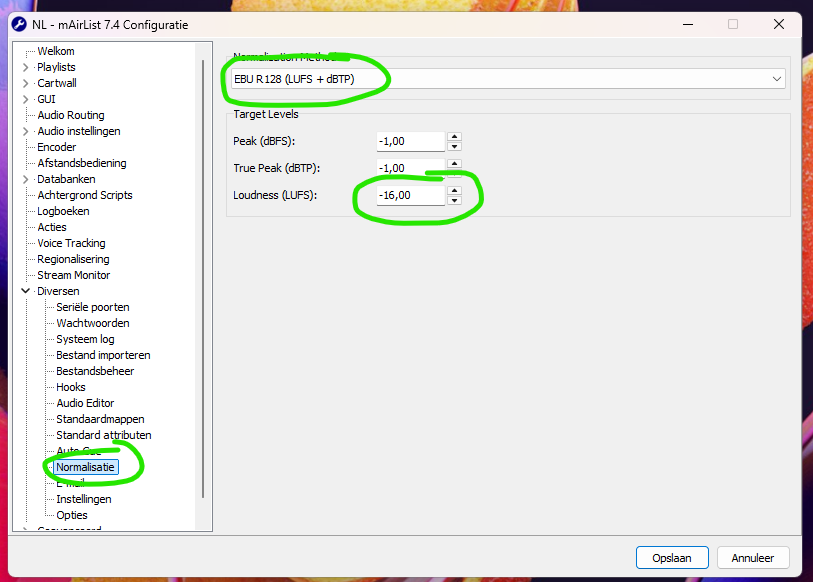
- Set the the normalization level in the system configuration’ dialogue to EBU R 128. The number is how loud mAirList will play the songs out. A lot of internet radio stations are using numbers between -12 and -16
- Activate the analysing process and activate the normalization
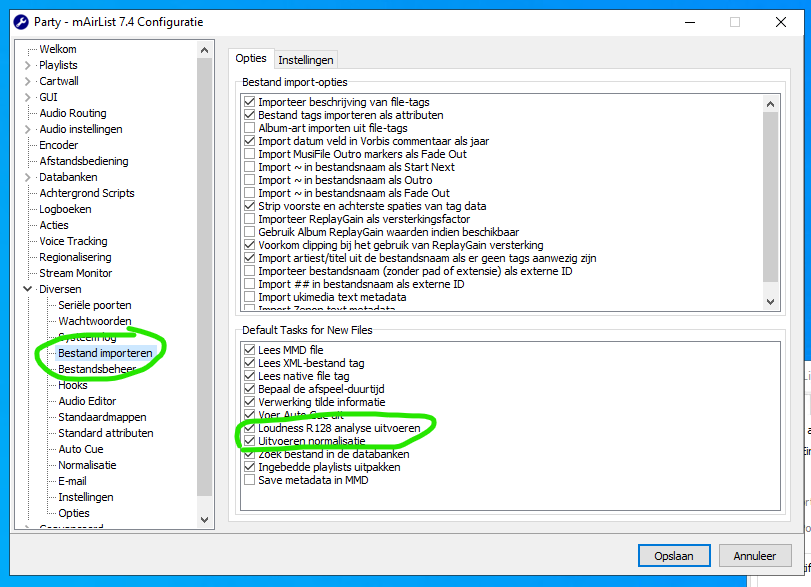
Now whenever you put a file in mAirList, that’s not in the database, mAirList will analyze and normalize the playout volume so every file in the playout will have the same loudness.
If you have files in the database already, just mark all, right-click “mass edit” and do the Analysis/Normalization for all files.
Importing new files in the storage synchronization:
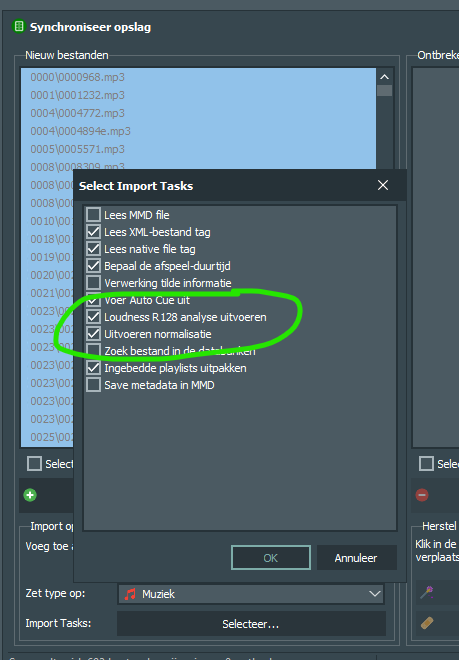
Set these both options and mAirList will do the tasks with every new import automatically:
Great will try it tomorrow . This is where i was looking for
Goos
I’m assuming you’re using MP3 files, which are generally not considered professional sound quality. The MP3s have different bitrates and AGC, are recorded loudly, and also have VBR. Set the Input and Output levels correctly in your sound card.
Amateurs play with MP3s, while professionals use Wave files from original CDs. That’s it.
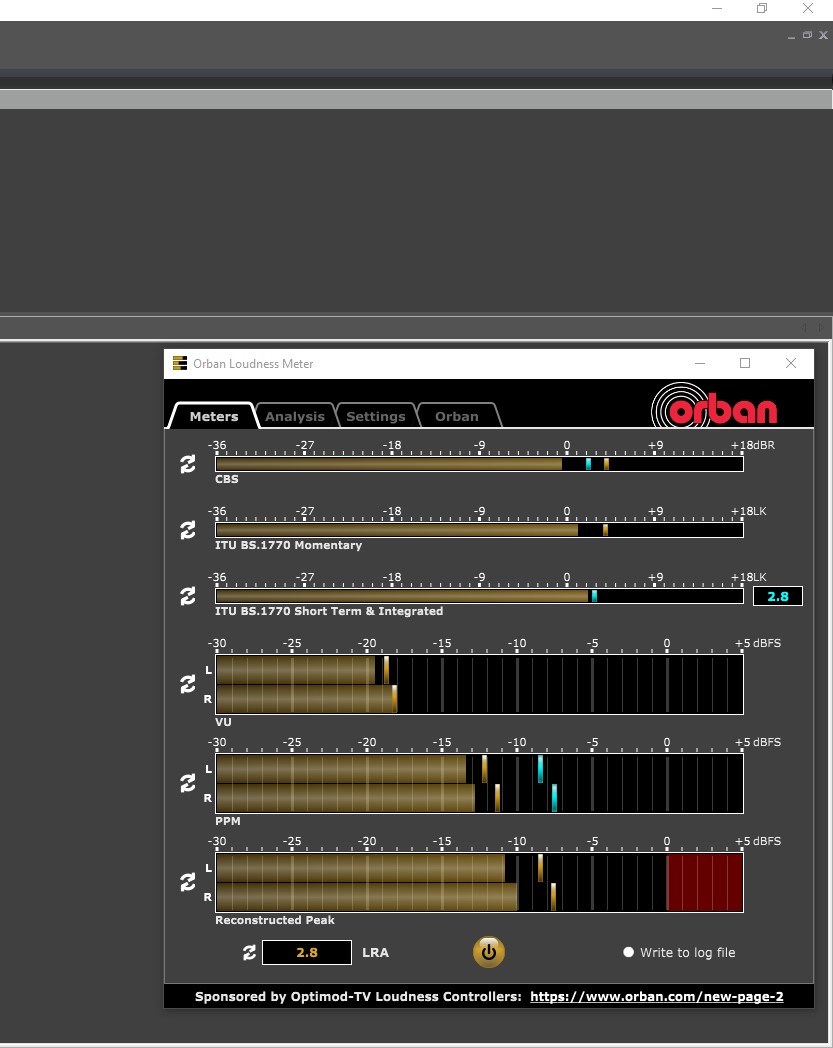
Great where can we find the plug in
I don’t know what audio cards you’re using. Such settings are available in professional audio cards like Digigram, Audioscience, Dante, and IP drivers like Axia. Playing radio isn’t cheap. A radio console allows you to adjust the volume,
but as a rule, the input level to the console should be the same for all playback devices, such as CD players and turntables. It’s difficult to convey everything remotely.
I am using a D&R Webstation Standard USB soundcard
@Dominik I’m sorry, but you are not helpful in any way for solving @Goos problem nor will any of what you have written does. He is struggling with the basic settings of evening the music loudness in the mAirList playout/database so please stop to confuse him with the “the orban loudness meter”. This plugin will NOT solve his problem.
 Puh…
Puh…
A lot of professional stations are using MP3 files CBR in 320kbps, even most show syndications are delivered in that format. They are not “recorded” in mp3 format, they are, in the best case, converted from a much better original CD or lossless file. I ripped 3500 CD from my archive and stored them in FLAC but I’m only using exports of CBR320 MP3s, even when I’m dj’ing in bigger local events.
You are right - the goal is always to get the best quality input for the chain - but I doubt that you will recognize any difference between a wav file and a CBR 320 mp3 file in an 192kb internet stream, let alone in an UKW transmission, listened to with a normal radio or a smart speaker like most people doing nowadays.
…but all media still would have a different loudness, so Goos would need to adjust the faders manually for every element. That’s impossible in an automated autonomous playout mode.
And now, surprise, that’s what mAirList ist doing for him by analyzing and normalizing the files in the way I described above and setting the player volume individually for EVERY element to align the playout loudness automatically… 
3 Likes
Yes your right Stefan , It is solved now . Thanks for helping out on this topic It is easier that mairlist does it automaticly . That was my onmly question 
3 Likes
Stefan one more thing , can it also be done when a playlist is loaded in the next hour like example at 59.00
Hi @Goos , great it works now!
If I remember correctly you are working with a database, right?
If so all normalization data is already stored for the element and will be used whenever you load that element in a player. No matter if it’s in a playlist or directly pulled in from the database.
Elements that are not already in the db (i.e. pulled in from a usb drive or a folder on your hard drive) will be processed when it will be loaded or buffered in the playlist.
So when you load a playlist and have 5 items pre-buffered they will be processed then automatically with the setting you made here
Yes i am working with the database , this is the answer what i was looking for thanks
1 Like
@Goos please don’t forget this step to add normalization to already existing files. mAirList will not do this automatically afterwards!
Your response added nothing. I didn’t say that radio stations record audio in MP3 format. Currently, songs by new artists—usually single-track artists who will be forgotten six months from now—appear in digital format compressed to MP3, and are delivered to radio stations in that format.
These sounds are clipped at the end, and the volume is set to 98-99, compared to 89 on CDs and LPsAnd that’s the fundamental problem. Even jingles are recorded in Wave format, unless the recipient requests an MP3. Previously, songs were delivered to radio stations on CD singles and later on full albums.
So, if I have an audio library on CDs and want to use it for broadcasting, why compress the audio to some MP3, which is lossy and has holes in the form of IDt3 tags, VBRs, etc. IDt3 tags aren’t even necessary to send metadata to RDS.
If you think otherwise, how did radio stations manage sending data via RDS 25-30 years ago? and howdid they cope with the audio level since computer broadcasting programs do not exist or there were several of them on the market, which are still being developed to this day.
Back then, analog consoles, CD players, etc., were used, and the stations were able to handle the volume levels. After all, we’ve had good-quality drives and even servers on the market for decades, which can hold wave files even if you rip them from 4,000 CDs. So I don’t understand why compressing audio files is necessary, and what’s the point. It certainly doesn’t affect the quality. I don’t know what you do, but you haven’t really helped your friend. If Mairlist didn’t have this sound normalization feature, what other solution would you have found? I didn’t say that Orabn Loudness Meter would solve this problem.
Oraban Loudness Meter is for everyone, professional and novice alike. Once installed, you can properlyset the input and output levels of your sound card, for example, when playing sounds from Winamp, Media Player, etc. Because Mairlist is a low-budget program, the manufacturer considered the potential user to likely use a low-quality audio database, and that’s why they included it. And if it didn’t have this feature, what solution would you recommend? You don’t have to spend 1,000 euros on a program to broadcast? A program that looks terrible at first glance, and even if you pay 1,000 euros, you still have to spend time improving its appearance. It’s frustrating. You can also change the appearance in Winamp, but you don’t pay for it. That’s why professional radio broadcasting programs start at 3,600 euros and up. Once installed, everything looks and feels as it should. Furthermore, what quality can a 1,000-euro radio console offer if professional audio cards cost so much? It’s similar with all those cheap DSP plugins like Sterotool, which require a fast and efficient computer and a professional audio card that supports the ASIO protocol. Buy the right processor and let’s broadcast. What more can I say?
…neither did I. I just quoted you.
and replied
Now stating
is nothing new to all of us.
And that’s why Goos needed a feature to have the same level of loudness in the automated playout to be able for a mix of older and newer files. And that’s why mAirList and most other playout automations can do that.
Again: Your “answer” didn’t target the question of Goos but was used to show your “knowledge” and writing a lot of stuff that didn’t help him in any way.
And why should Goos go and install it? No explanation at all for him. That made no sense.
As one of the MODS I’m not his “friend”, just helping him like we already did help you with your questions.
More than your’s and more help than you did, obviously:
And that’s all that counts.
2 Likes