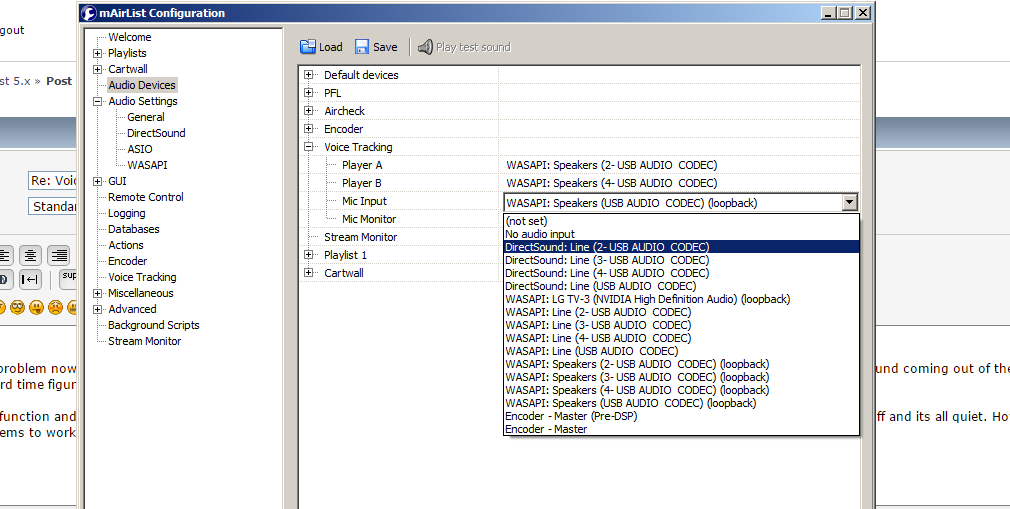
I would like to generate a play list for 3-4 days in advance. Figured how to do that. I also inserted dummies into the PLay list in order to mark where the VT should go. My question is, how can the talent access the log and see where he needs to VT if the playlists loads hour after hour? Does this technically mean he cant voicetrack more than one hour in advance?
I have ran into a different problem now. In the configuration panel, voicetracking section I have set the channels for player a and b. When I do the test sound, I get sound coming out of the D&R board. However, I have hard time figuring what to select as mic input. Please see the attached screen shot.
Also, when I enter the VT function and I try to preview player A or player B, i get no sound coming from the sliders on the D&R. I have tried CUE, Slider up,down, on/off and its all quiet. However, when I go back into config, it seems to work again when I test the sound. What am I doing wrong?
6.9 USB OUTPUTS
There are 4 stereo USB signals sent to you PC through the USB connector on the back of your console.
USB-1 = Main program signal.
USB-2 = AUX output signal
USB-3 = Voice track signal
USB-4 = (off) AIR signal
USB-5 = VoIP signal (has its own USB connector)
So you need USB-3 - just remember that Windows might have assigned it a different number. You better go to Windows Audio Setttings, Record Devies, and check which input carries the mic-only signal.
I’m not aware of any issues with the VT output. Please double-check the sound card assignment.