I use mArList in combination with a D&R Airlite mixer. I have configured 4 players A-D. During non-stop “auto”, only player D runs and the sound goes directly to the Encoder. The mixer is then free for use.
Now when I try to record, the VoiceTrack is audible on the broadcast. Apparently a setting is not yet correct. I’ve tried a lot, but I keep hearing myself talking on the live broadcast. It just doesn’t work…
Which setting should I change?
@Stefan_Hillen Do you have a clue?
@Torben Can you please check which setting is incorrect?
Hello Adriaan 
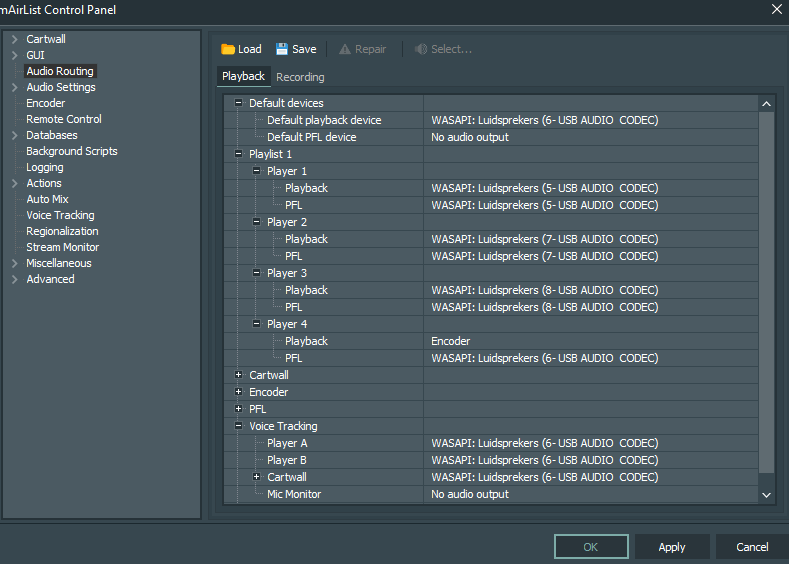
Please don’t tell me that player D is 6-USB AUDIO CODEC.
Why not?
Well, it’s the Default playback device. I’m not sure, but could there be a conflict in the audio routing?
Good evening @UliNobbe ,
There is no problem with the audio routing during the non-stop.
What I’m looking for is the reason why, when I press the “ON” button on my D&R Airlite for several seconds and the “ON” button flashes, I cannot make an audio recording in VT. The meter doesn’t read.
Hi Adriaan,
maybe it’s because of the translation that I didn’t understand the problem but now it seems to be more clear:
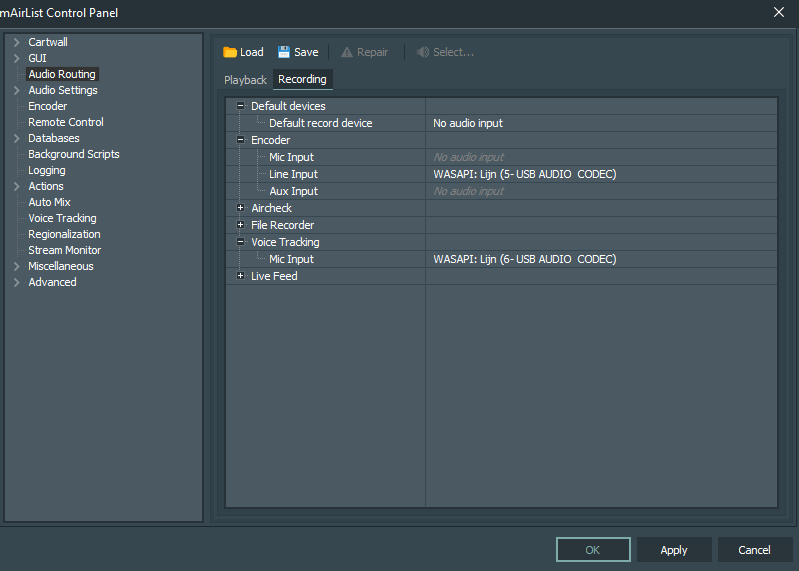
The Airlite uses an extra VT-Mic circuit, whenever you press and long hold the ON button. So you need to use this specifiv VT-MIC soundcard input in the audio routing instead the one for the playout input.
You just have to figure out which it is 
Hopefully I got the problem right this time…
1 Like
How nice it would be if we all spoke the same language. Prevents a lot of confusion
This - plus the fact that I didn’t switch the microphone channel to VT-mode properly  - explains why my recording was heard in the non-stop broadcast.
I found the VT-MIC soundcard (it was WASAPI: lijn 8 USB AUDIO CODEC) and now it is recording! Thank you very much @Stefan_Hillen !
2 Likes