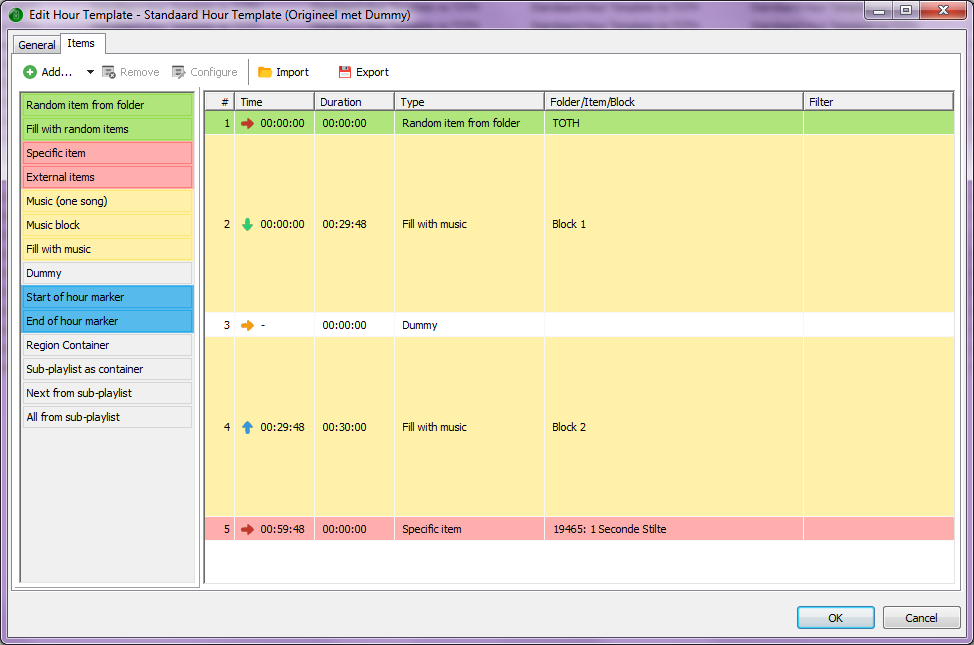
Backtime your last chain of songs before the hour and make it so they will end at 00:00. Than your TOTH will always start exactly at 00:00.
Something like the template I’m using. The last item, 1 second of silence has a fixed time, my TOTH starts at XX:59:48 and the “beep” is exactly at XX:00:00.
The disadvantage is that somewhere a song will be cut of (the last song of the first block) due to the backtimed chain.
You can also use the “Anchor” marker, place it onto the beginning of the beep, and all backtiming and fixtime calculations will be performed with regards to that marker then
Thanks Torben, I didn’t know that although I did set an anchor marker on the beginning of the beep.
Are you sure about this? (I guess you are ;))
When the playlist for the next hour is loaded (at 10:55:00 for example), mAirlist doesn’t know at what time the TOTH of the next playlist will start (in my case at 11:59:48) until this playlist itself is loaded (at 11:55:00). In order to avoid the last seconds of the last song to be cut with 12 seconds, I have put this 1 second of silence with a fixed time of XX:59:48 in the template.
If I understand you correctly, the 1 second of silence with the fixed time isn’t necessary?
to give you an example: I have an element for the beep according TOTH, using an anchor marker.
It starts, backtimed, at xx:59:47. The playlist of the next hour will be loaded at xx.59:39.
My playlist has no silence or something like that. But I decided not to set an end of the hour marker in the playlist; instead I made it longer (Block 2 in your example would have a length of 00:31:01).
So your playlist will be longer than one hour, but will be cut off precisely according to the anchored element of the new hour.
Oh, by the way: Depending on your cross-over fade time, your TOTH element should have silence of half of the fade time before (add it in Audacity or any DAW) and delete auto Cue-In for this element.
Hi Uli, thanks for your reply. Always interesting how other users use mAirlist and never too old to learn.
In my case the songs in the second half of the hour are all backchained. When the last song is finished the TOTH of the next hour kicks in and the beep is exactly at xx:00:00. All works well by the way.
If I understand you correctly, in your example the last song will be cut somewhere and that’s something I don’t want so close to the top of the hour. I have rather a cut somewhere in the middle of the hour, in my opinion that’s less striking.
In my case the TOTH is the first item of the playlist (it also contains a time announcement). Am I right that your TOTH is the last item of your playlist? Coming to think of it that might be a good idea as well.
That’s true. I didn’t try it the other way round, like you. But it seems to be a nice idea, indeed.
For my example, the end of the hour must be set to xx:59:47, where the next playlist starts (anchored TOTH element). Hm.
I should give that a try.
Since I have an element at xx:40:00 (soft), this could be a possible playground for testing it.
There is a small difference in our templates: Your Dummy (#3) divides Block 1 and 2. I divide Block 1 and 1.
Surprisingly this combination meets the requirements of the music template, regardless of whether the block is divided or not. From this point of view there is no need for setting up two different blocks.
Sorry: No. We work the same way. My TOTH is the first element of the next hour, too. 8)
I’ll send you screenshots when my mAirList PC is up and ready.
I do need two blocks as block 2 is backtimed and block 1 isn’t. If the dummy wasn’t there, the scheduler would fill block 2 completely and leaving block 1 empty. During playtime the dummy is removed through a script I got from Torben. Otherwise we would encounter occasional underruns due to a hookscript at the beginning of the hour. The script is executed through an event at the beginning of the hour.