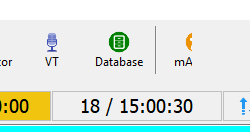
Unexpected visual / behaviour in builds 6000 to 6006: when connecting to my playout machine via Remote Desktop Connection, the playout toolbar functionality shifts along by one button and part of it is obscured on the right side:
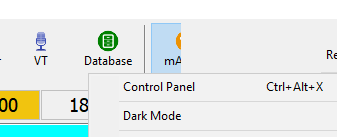
Clicking on the mAirList button doesn’t do anything (it looks like it is toggling), but clicking on Database (or the divider) brings up the menu (in the image below I have clicked ‘Database’) though you can’t see the cursor):
It’s like the click region has been shifted along: clicking anywhere from about 33% from the left performs the next button’s function, i.e. VT brings up the Database; Mix Editor brings up the VT window.
Closing mAirList and re-opening restores the view and functionality, but disconnecting via RDP and re-connecting exhibits this behaviour again.
I wonder if it is something to do with the screen resolution changing between what is set natively on the local machine, and what size is requested via RDP? I’ll keep playing.
Is only the toolbar affected? Or other parts of the GUI as well?
Maybe it is related to the scaling factor set in the Windows display settings? (Not sure how that affects RDP anyway.)
By the way, I have uploaded build 6008, it has a new GUI → General option “Reduce flicker in RDP sessions”, something I came across when investigating your issue. I don’t think it is actually related, but please try it anyway.
Thanks for the anti-flicker option (which was enabled by default when I checked) - this was definitely an issue too.
Unfortunately Build 6008 hasn’t stopped the RDP issue. I have established ‘what’ is happening, even if I don’t know ‘why’. The toolbar is scaling up slightly between RDP sessions, and the buttons are (visually) shifted along with a larger font size. I have now extended the Toolbar element in the Layout Designer so that it is now wider - this is why, before, it looked like it was cutting off as it wasn’t wide enough for all the buttons to be shown.
The two screenshots below are immediately before and after disconnecting/reconnecting via RDP. mAirList had been opened fresh right before the ‘before’ image.
It’s Windows 10 running as a virtual machine under Proxmox - so, no, there isn’t a physical screen attached.
I have also noticed that the display corruption only occurs at the point of RDP disconnect. The first time I connect to the machine via RDP, the toolbar is drawn correctly, but after disconnecting, re-connecting again (by any method - RDP, VNC, SPICE) shows the toolbar drawing incorrectly.
I have also since discovered that if the toolbar is detached in the Layout editor, then these issues do not occur.
The issue is also not present in mAirList 7.4.2 build 5818.
I happen to run Proxmox on my server as well, and I did a few tests on a Windows 10 VM, but it doesn’t happen here.
Regarding mAirList 7.x vs 8.x, I suspect it is some behavior or bug introduced in the newer Delphi version I use for mAirList 8. Can’t finy anything in the Delphi docs, bugtracker, or forums though.
Good find. I added the “SingleBufferingInRemoteSessions := false” thing to the app initialization. Can you check if it makes a difference? Snapshot build 6039 has it included.
I can only assume it is something in the underlying Delphi 12 architecture (or the component that the toolbar is based on) that is causing the issue - version 7 runs without this problem on the very same (virtual) machine.
If I have any other bright ideas I shall let you know!