Not sure what I am doing wrong here…
When generating the playlist the first part is skipped.
Only music is picked out of item 3 and 4 it is skipping item 2
Please advise.
Regards,
Ferry
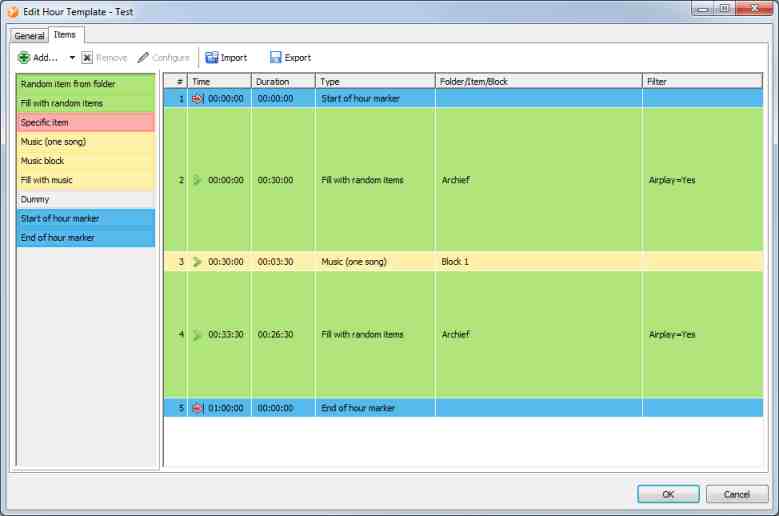
Not sure what I am doing wrong here…
When generating the playlist the first part is skipped.
Only music is picked out of item 3 and 4 it is skipping item 2
Please advise.
Regards,
Ferry
Try setting the timing of item 3 to soft fixed time, with time 00:30:00.
I think that is your intention anyway, starting the second half of the hour with a particular song from block 1, right? So there should be a fixed time on it.
The “planned duration” setting is only for the planning person (you!) to have an idea how long the particular items/blocks will be. Items of type “fill with…” should always be set to “infinite/fill”. They will automatically float into the gaps of the non-fill items.
What happens right now is:
In phase 1, the scheduler picks all non-filling items, in this example: item 1, 3, and 5.
In phase 2, the scheduler checks if there are gaps between the items, and uses the “fill with…” items to fill those gaps.
But as item #3 has no fixed time, it sits directly after item 1, so there is no gap between 1 and 3, and only the filling item 4 will be used to fill the gap between 3 and 5.
Got it!
Setting it to a Soft Fixed Time solved my problem.
Thanks!