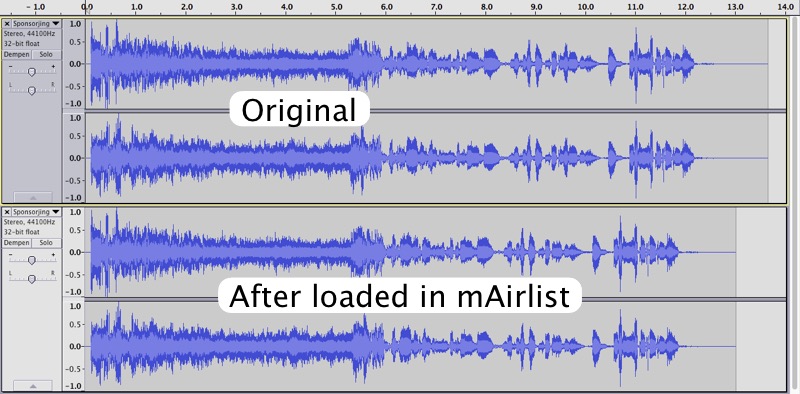
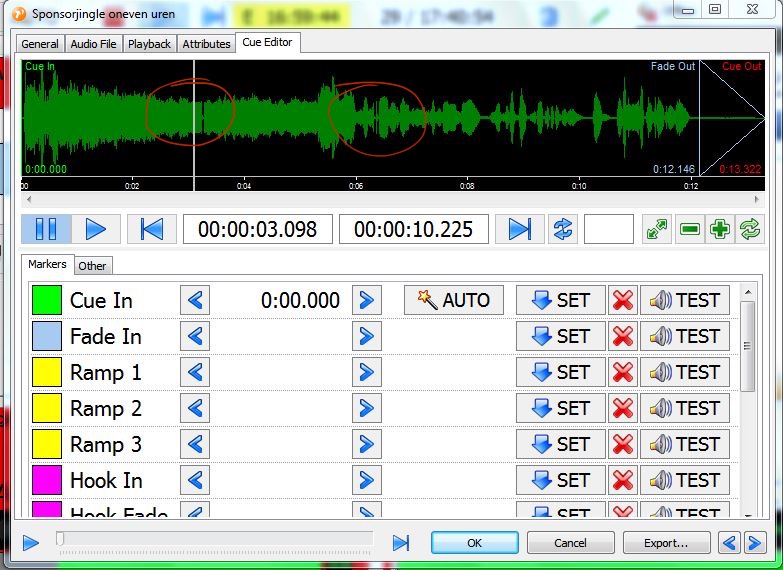
I have a strange issue. I’m testing mAirList and some tracks having gaps in it after loaded in mAirList (and also saved in the track). Please see the attached previews.
audacity.jpg: on top is the original below it, same track after loaded in mAirList
gaps.jpg: in PFL que editer
Music tracks are stored on the same HD (in this test setup).
Why are there two versions? What do you mean by “after loaded into mAirList”? mAirList doesn’t change any files just by loading them (unless you convert them during DB import or so.)
Thats the problem… mAirList is changing the files, or, something else does. I putted 2 clear tracks on a USB stick, load (drag) them into mAirList and the issue appears in mAirList and also when I play the tracks on an other system.
I put 2 new tracks in the same dropbox:
O’G3NE - Magic.mp3 = original track O’G3NE - Magic-diff.mp3 = First 18 seconds you hear the original… from about 19 seconds you hear the same track… but thats after I loaded and played it (dragged from a USB stick) in mAirList…
No, it doesn’t matter where the tracks are stored. In the first post I wrote that the tracks are stored on the same HD (hard disk) and for testing I used an USB stick too.
Maybe the mAirList processes are to heavy for the computer?
So you mean, you have a proper, intact MP3 file, open it in mAirList, and all of a sudden, the same file is modified on disk? Just by playing it in mAirList?
Just by loading the file into mAirList, the file should never be modified. mAirList does not open files for writing, only for reading (except you execute something like “export to file tag”).
That being said, for MP3 files, BASS uses the ACM codec installed in your Windows system. The default Fraunhofer decoder that comes with Windows should never, never do this kind of stuff. So there is a theoretical chance that you have, for some reason, another ACM codec installed which incorperates a special “I break everythin I play” function. I have never heard of something like that, but it’s the only possible explanation that comes into my mind. (And it’s beyond my responsibility.)
No, that doesn’t make sense. LAME and Stereo Tool process the outgoing signal. They will never touch the original files. (They don’t even know what the original files were.)
When you make the file write protected in Windows Explorer, does it still happen? Do you see a message like “access denied” at some point?
When you make the file write protected in Windows Explorer, does it still happen? Do you see a message like "access denied" at some point?
Yes... access denied (only read and run)... but
S%$^T … WindowsMediaPlayer does the same!! Sorry, sorry, didn’t try WMP before… It does edit the track somehow. And after playing it in mAirList it is edited twice… OMG… what to do next. I’m using the onboard “smart thinking” >:( soundcard for testing… where can I find the ACM codec or other codec? I hope you can help!
Thanks Torben, patrikmr and mattauckland for your help on this!
The systems runs for a couple of day’s stable (that’s why I’m answering a bit late, needed to know for sure, sorry).
What I did: I took 2 other computers (Pentium Core 2 Duo 1,8GHz - 3BG RAM - Win7)… and moved StereoTool (standalone version) and Stream encoder to an other computer. So, I have two computers running. On the first computer runs: mAirList, StationPlaylistCreator and Newsdownloadertool. The other computer: StereoTool and the Stream encoder.
The problem of stuttering and killing of tracks is gone… although I think it is very strange that this is happening when a computer processor runs into 100%. I don’t know why, what of how… Strange it is. Maybe it was the computer itself?
I have to admit that StereoTool can be very heavy stuff for computers…
All is running fine, also “Now Playing” and Playlist HTML output (logging) on the website. Next week (I hope) we’re going to replace the old system (mAirList v2 hehe) for these two engines!
Sounds about right. I just built a Stereo Tool machine for a community radio station I tech for.
The old machine was a Dell XP box. 3.0GHz processor, 2GB RAM. Did have a few struggling issues, but it was stable…well until it decided to shut down in the early hours one day, and not power up.
So I set about building a new system. i3, 4GB DDR3 (it was lying around), Acoustically treated case, Samsung SSD (OS), Windows 7 Pro 64bit. Now we’re running the Stereo Tools 64bit install, and in this setup I’ve set Stereo Tools to real-time processing, and she runs like a dream! Around £300 for the build, but well worth it for the reliability of a new system, with plenty of power if needed.
In addition the bios is set to auto power-up in event of power restore after power failure, and Windows is configured to auto-logon and start Stereo Tools.
A simple point to save some CPU power on mAirList can be, turn off Wave-Form Display and other heavy gui stuff. I don’t think it will drop the required CPU ressource that low, that you can run Steretool, but a while ago somebody in the german forum, made mAirList running on a much slower computer with these settings.