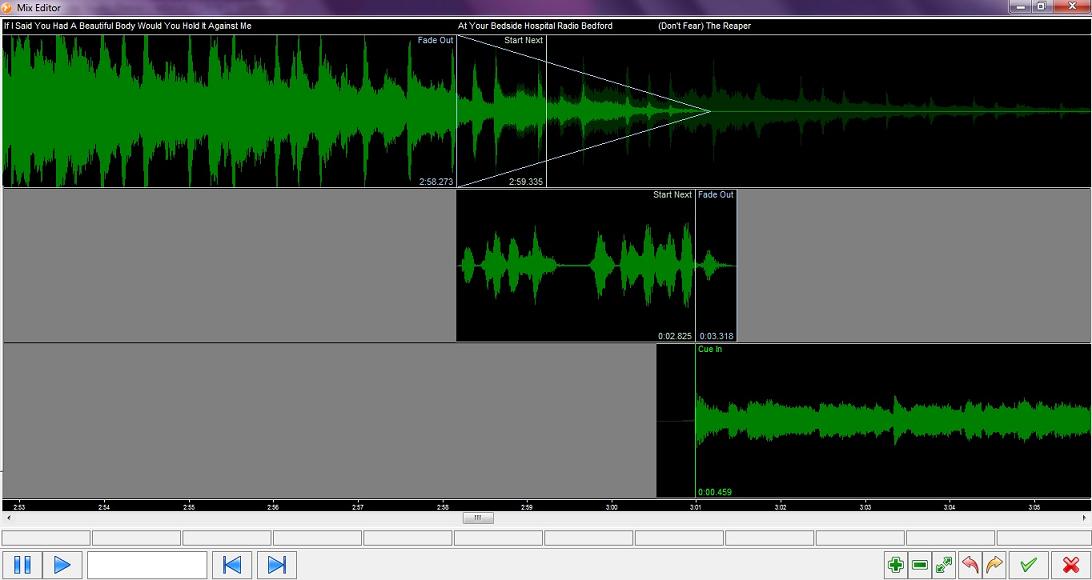
If you want to fade a track early (as it goes on a bit…) then you add a fade out marker. If the fade happens over a period of, say, 3 seconds then I would have thought that you would want the next item to start after the original track has faded at least a little bit (say for arguments sake 1s after start of fade).
I tried adding a ‘Start Next’ marker thinking that this would override starting the next track at the beginning of the fade but it did not seem to make any difference as I could not drag the start of the next item beyond the ‘Fade Out’ marker. (see attachment)
Can anyone tell me how to delay the start of the next track until the original track has faded a little or am I misunderstanding the concept here?
I may not understand exactly what you’re asking. Are you saying that you want the track to NOT fade until it reaches the Fade Out marker?
My understanding is that the Fade Out marker starts the next element and immediately begins fading the on-air track. The Start Next marker starts the next element but does not fade the on-air element (it continues to play until another marker or its end is reached).
Torben - I understand that is how it works but let me try a different approach to describe what I mean …
If a fading song is marked through the ‘Auto’ Fade Out feature then the point chosen by mAirlist is -30dB down (configurable of course!!) on something (average level for track or whatever).
Now, if you wanted to force the track to fade say 1 minute before the end of the track (because it goes on far too long) then you would add ‘Fade Out’ point which makes sense.
My logic is therefore that on encountering a ‘Fade Out’ marker the next event should not start playing until the current track had dipped to -30dB (or whatever) as this replicates what would happen on a normal fading end. If the next track is started as soon as the ‘Fade Out’ marker is reached and the current track is still at full volume then it can sometimes sound a bit like a car crash.
And so to a possible solution - currently if you try to drag the second track to the right (past the ‘Fade Out’ marker) then a ‘Start Next’ marker appears but, as you say, this is ignored as the ‘Fade Out’ point comes first. If this restriction was removed so the ‘Start Next’ marker (if set) has priority over the ‘Fade Out’ marker even if it is set after the ‘Fade Out’ marker then that would seem, to me at least, to cover all bases.
I agree, it would be a nice option to have in the Mairlist options.
I find it especially with Dance Remixes, you sometimes want to have a very long fade out but dont wont the song 2 starting until “Start Next” has been reached.