I’ve been testing v6.1-beta build 3801 and came across a small bug in the Scheduler.
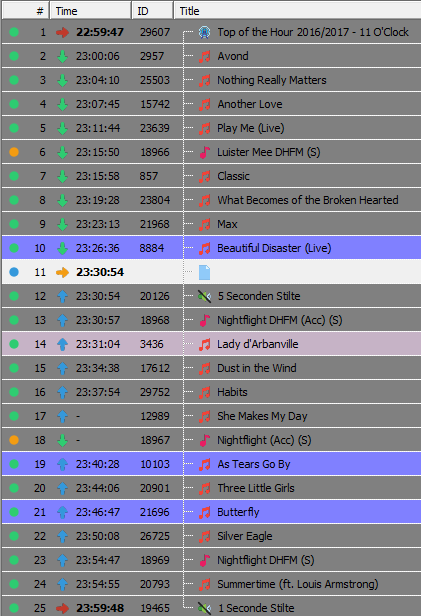
In the new Transition Template I have stated that after every 4 songs a jingle should be inserted. As you can see in the screenshot, Jingle #18 is inserted on the right place, but it’s not backtimed. As a result song #17 and jingle #18 are skipped.
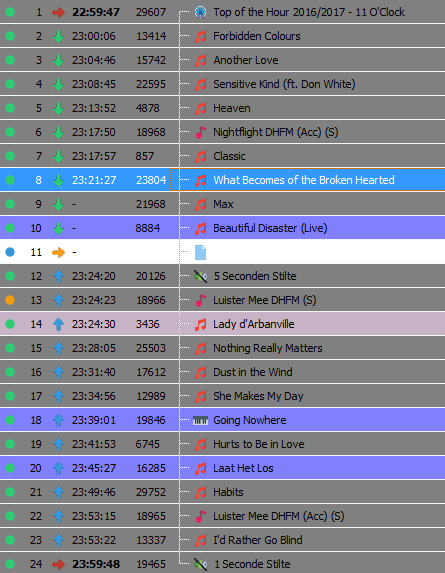
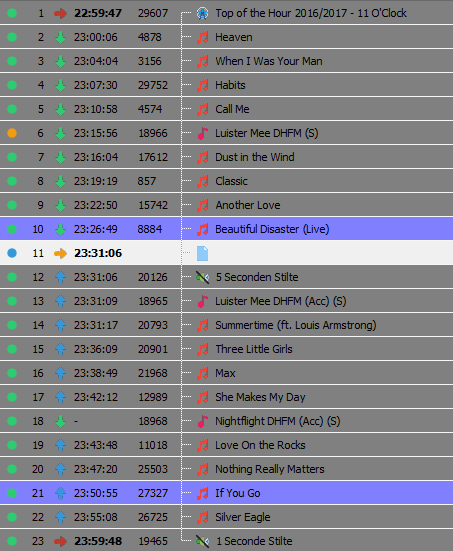
By repeating this over and over I get different results. Sometimes there’s no jingle at all, just 8 songs in a row (screenshot 2). Sometimes the jingle is inserted but not backtimed and as a result only the jingle is skipped (screenshot 3).
Sorry, only one script at this time. But you can use includes to chain them.
Haven’t had the time to take care of the transitions bug. I know where the problem is though. When transitions were/are part of the music template, it would just use the timing you set for the entire music block. Now that they are a template of their own, they are inserted at the very end of the scheduling process, and they must somehow “guess” an appropriate value based on the timings of the surrounding music items.