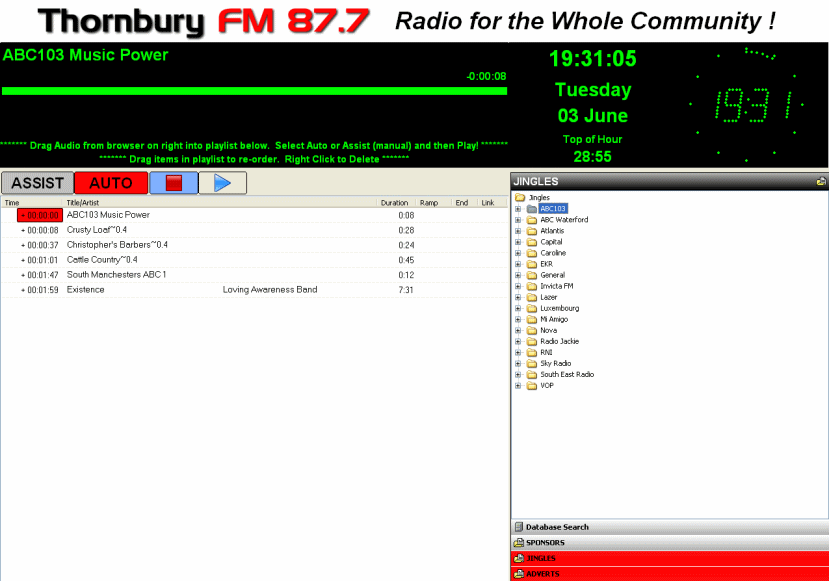
With a lot of help of Tony, Charlie, CAD and Torben, in the space of a couple of weeks I have gone from knowing nothing to producing a tailor-made layout for our station! So after all the hard work I thought I’d make it publicly available for anyone else with similar requirements.
Layout Brief:
This is designed to be a REALLY simple live-assist player which any novice presenter can use with no prior training - for example running an advert break sandwiched by a jingle or two. Basically just browse the audio files you need, drag and drop them into the playlist and then hit play to play the list (ie ad break) automatically. There is an option to select manual “Assist” mode as well, but it defaults to Auto on startup.
Notes:
In order to make it simple (and probably much to the disgust of other forum members!) I tried to strip-out or hide as much “superfluous” (to us) functionality as possible. You can gain access to these functions as follows:
Main Toolbar - this is hidden behind the Thornbury FM logo. However I left one or two pixels at the top, so if you hover with the mouse in the right places you can still access these buttons!
Browser Toolbar - the buttons are turned off. To turn them back on, open skin.ini and find these entries and set them to on instead of off: ShowAdd=off ShowRefresh=off ShowClose=off
Event scheduler - could not turn this off, so instead it is hidden under a text field (Screenobject 10) !!
Attached is a zip file containing screenshot and the Config files.
Happy playing!
Glyn
Layout Files.zip (42.2 KB)