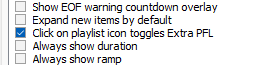
Properties - auto play

Hi guys,

sometimes i want to check the audio part of the element from the playlist so then i double-click the element and the Cue Editor shows up. Is it possible to make Cue Editor immediately starts playing after opening audio element properties? I want to avoid manually clickin the play option there.

Thanks.

Click on the icon (or album art, if enabeld) in the Playlist, that will start the playback immediately. If the song is already playing, you will hear the EOF; configurable in the control-app.

Or right-click → PFL will jump to the Cue Editor page and start playing.

Ooooh! Didn’t knew that! Thanks, that will significantly change my workflow!

Since when is that possible? Please tell me that this is a completely new feature, otherwise I’ll make a fool of myself as a maillist veteran. :joy_cat:

My guess is: at least since v5.

Thanks guys. Theres an option in the config too. I forgot about it :slight_smile:

{ABD27A64-F7A6-4C2E-BF96-8FDA1944C7C9}

1.3.4 (2005-05-05)
(...)
- Beide PFL-Varianten (normal und Extra) über das Kontextmenü zu erreichen

:united_kingdom: :united_states: Both PFL options (Normal and Extra) can be accessed via the context menu

1.1.16 (2003-10-23)
- Extra-PFL-Vorhörfunktion (rechte Maustaste auf Playlist-Element)

:united_kingdom: :united_states: Extra PFL preview function (right-click on a playlist item)

:information_source: Source: https://download.mairlist.com/archive/mAirList/v1.3/WHATSNEW.txt

Gotcha! :smiling_face_with_sunglasses:

Busted! For some reason, my brain wanted to see a completely new function there… Of course, I’ve known about the context menu for years! :joy_cat:

No idea, it was probably because of my nasty flu that I didn’t read it properly right away. So thanks for waking me up! :joy_cat:

You’re welcome. Maybe this even makes your illness go away?

Not really, but I’m on a better way, thanks! :hugs: