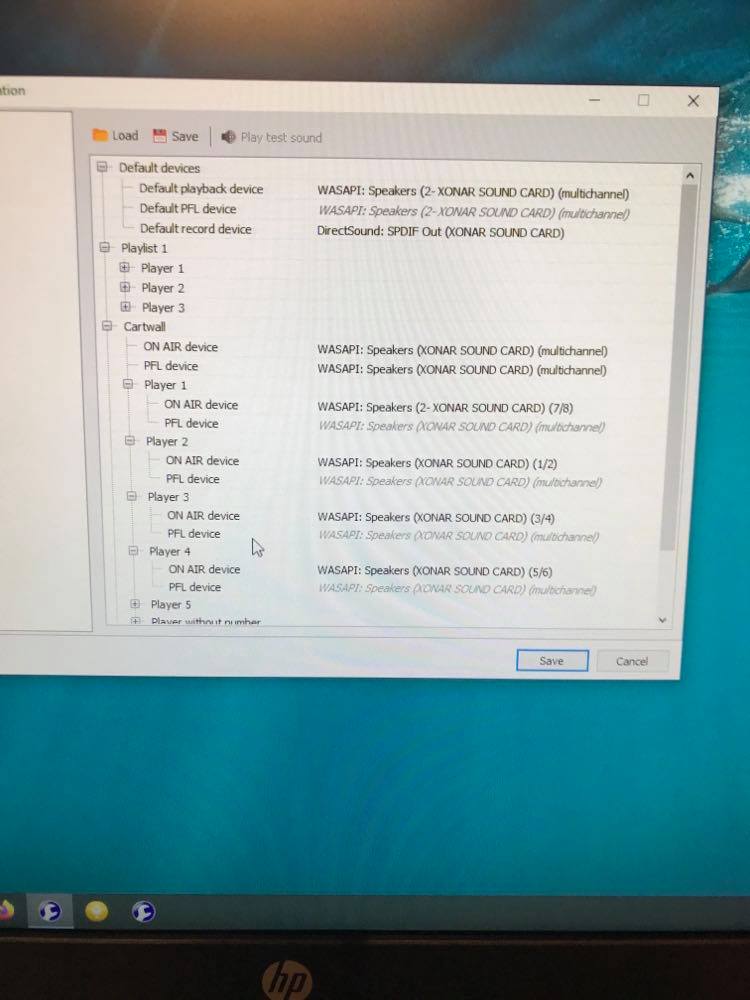
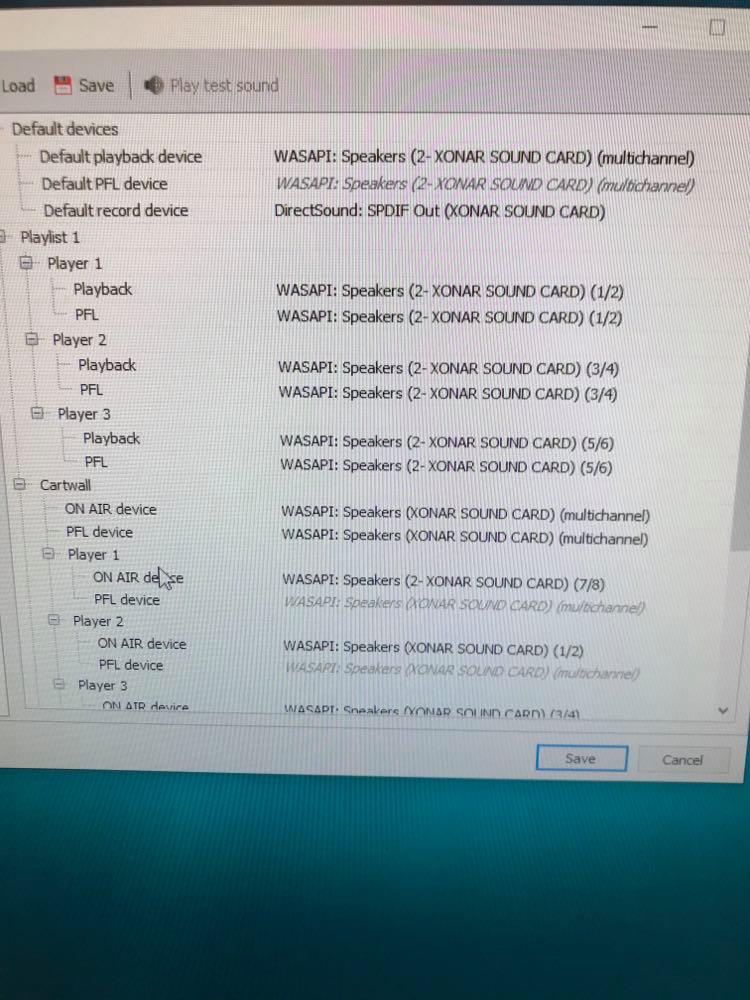
HI, hope somebody can help here. I have a few issues with player/cart audio allocation.
I use ASOS Xonar AE 7.1 but the channel numbers on 2/3 and 3/4 are reversed so I select Player 2 to play on channel 3/4 which corresponds to my mixer faders and it plays on the wrong fader. I can fix it by plugging the fader lead into the wrong port on the soundcard but its obviously not the right fix.
It seems to have developed a bug when playing on channel 3/4 on both sound cards (I was using one for players and one for carts) where it plays back in a very low quality and is mono. It’s not the desk as I’ve swapped leads over etc to establish the problem, it all seems to point to Mairist.
Similar problem with cart audio output on channel 3/4 using the second sound card which plays low quality mono but on the wrong channel as does 5/6.
I’ve spent hrs uninstalling/reinstalling, software, device manager etc but no change so any ideas please?
UPDATE - Spent most of the day replacing the sound card, uninstalling drivers, software etc and still the same. If I play a song on the player and switch it while its playing to channel 3/4 it goes poor quality and only plays one speaker, switch back to any other channel apart from 3/4 and it work fine so it must be a bug in Mairlist? I’ve also uninstalled mairlist, deleted everything and started from scratch and still the same. This seems to have happened in the past few days as before it was perfect. Maybe its the windows update? Please help I’m going mad here
Did you you change the soundcard settings in the audio manager so it works as a real 5.1 or 7.1 card? Maybe the were lost during the last windows update.
Oh and… when everything’s working fine again maybe you would like to install this software to prevent windows from doing unwanted updates: https://www.winupdatestop.com/
Thank you, I’ve managed to get 3 out of 4 channels working on both soundcards but channel 3/4 on the Xonar card just plays low quality on the right channel, I’ve tried everything 🥲 on the sound blaster card I can get 3 channels working but the 4th is no sound at all. Half the issue has been the outputs do not match the channels on Mairlist and both cards are different so say 1/2 I would expect to be on the first Jack on the card, 3/4 the second etc but they are all mixed up and both are different which had my brain frying! Ive been through every setting possible but don’t see any windows based options for 7.1 though
Ok thanks, having spent another 4 hrs swapping, deleting, rebooting etc I’m now convinced it is a bug in Mairlist because I got another soundcard, re-installed the software and drivers, moved it to another slot in the mother board, added another identical soundcard and plugged in some cans directly into each port to see how they behave and there is still a problem but only when 3/4 is selected on either soundcard. This equates to the “centre” jack on the card and all it plays is one channel and a very deep muffled bass on the other which fooled me initially as it made the VUs bounce giving the impression that it was actually playing bother channels correctly.
The other observation is channel 1/2 is much louder than the other channels so effectively I cant use all 4 channels, only 3.
The other issue is channel 4/5 only plays on the main default soundcard and not on the correct fader which is weird so any help very much appreciated. I’ve been through all the setting suggested already. Cheers
First of all, would you please be so kind to delete the DirectSound from record in standard device ( I don’t think that you really need it). We recommend not to mix up DirectSound and WASAPI.
Next, what I don’t understand: Why do you give each cartplayer an own channel on the soundcard which is the same as a player channel?
Can you explain your intention of this audio devices setup, please?
Ok I can delete the other device no problem, but I tried it this morning with it disabled and it was the same.
" Next, what I don’t understand: Why do you give each cartplayer an own channel on the soundcard which is the same as a player channel?" The carts and players are not on the same channel, the are on the other soundcard., I’ve changed the channel settings since the image was posted but the principle is the same, Players and 2 carts on one soundcard, then the carts all on the other soundcard. I have a desk with plenty of faders and remote starts so wanted to make the most of them, I have the remote starts working perfectly but not the sound.
How can Windows figure out the difference between the two soundcards? Are they cascaded or how does it work? Is there a possibility of influencing each other on the level of Windows?
No because it does it even with only one soundcard, if you look at the image it tells you the board number of each card so you can pick the correct one to play through, its not the card as I’ve swapped them over, etc hence why I think its Mairlist