Dear Torben,
In this Topic https://www.mairlist.com/forum/index.php/topic,7553.0.html we have discussed this issue before and it is still giving me problems with scheduling.
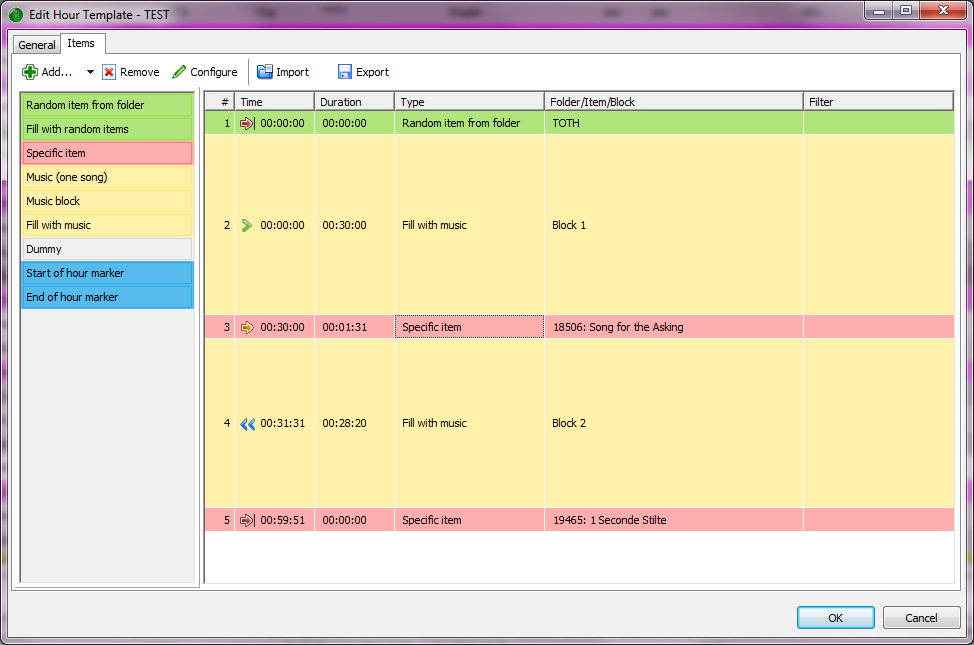
Basically I want two Blocks “Fill with music” of approximately 30 minutes each. The second block should be backtimed. See screenshot 1.
This doesn’t work as stated before, the second block will fill the entire hour, leaving the first block empty.
That’s why I put a dummy with a soft-fixed time at around 00:30:00 in the Hour Template. Scheduling works fine now but due to the Hookscript this could result in an underrun every now and then as described in the other Topic.
This week I read your recent Wiki about music scheduling and I got inspired to give it another try. I removed the dummy in the middle and inserted a Specific Item with a soft-fixed time of 00:30:00. (screenshot 2) Scheduling works well, the Station ID however will not be played (screenshot 3).
So I changed the Station ID to a song lasting 01:30 (screenshot 4). Still this entire song will not be played (screenshot 5).
Then I changed the Specific Item to a song lasting 01:31 (screenshot 6) and now finally the song (jingle or whatever) will be played (screenshot 7).
It looks like the algorithm ignores items lasting less than 01:31.
For testing purposes I inserted a musicblock in between blocks 1 and 2. This new block was filled with one item. Same thing happened, scheduling works fine but the item in this new Block was not scheduled if it lasted less than 01:41 (not 01:31 as before)
Could you have a look at this issue?
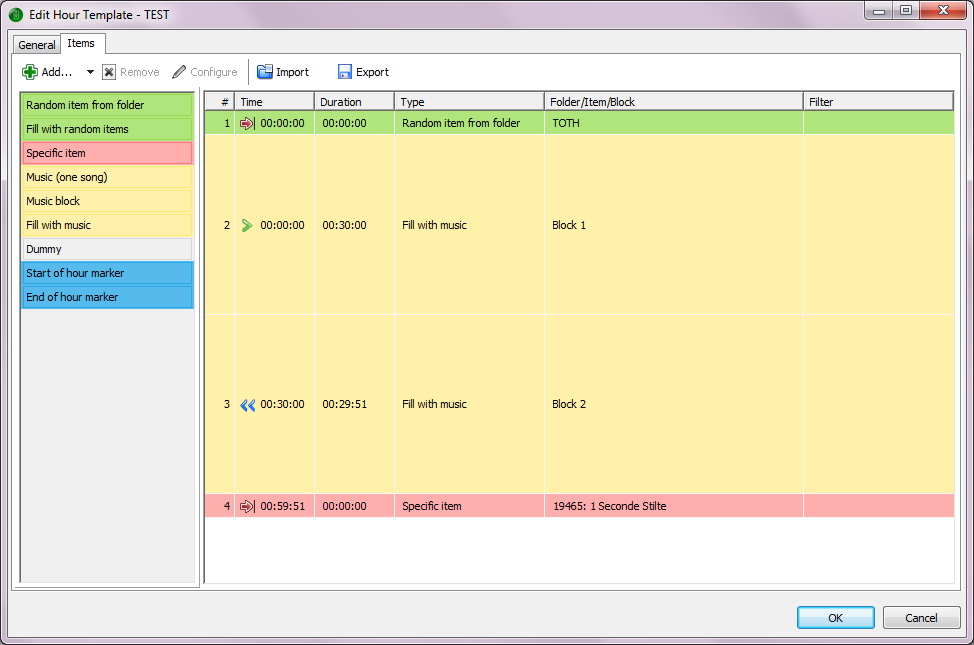
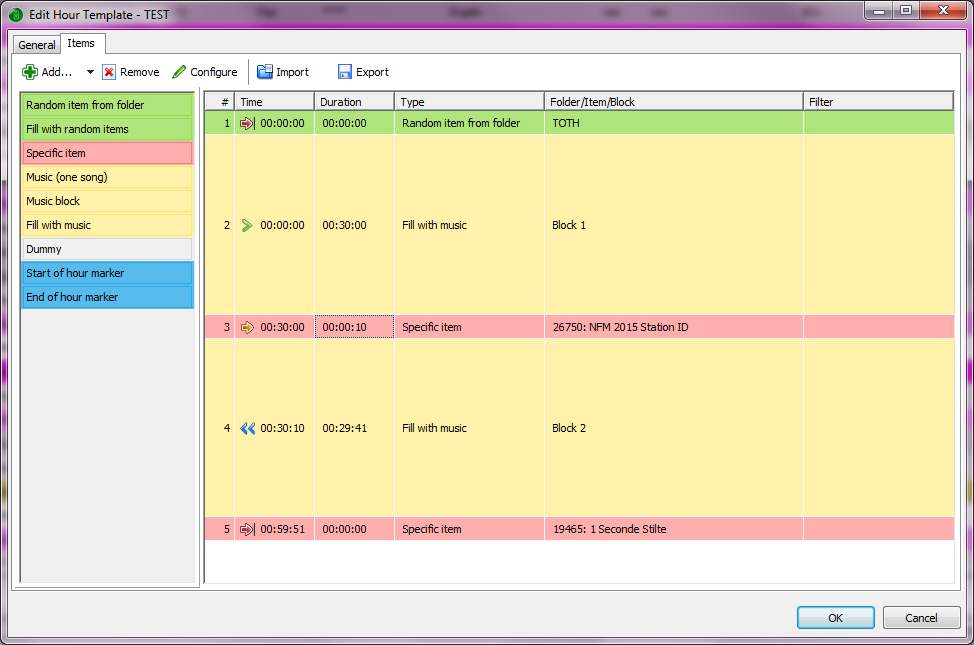

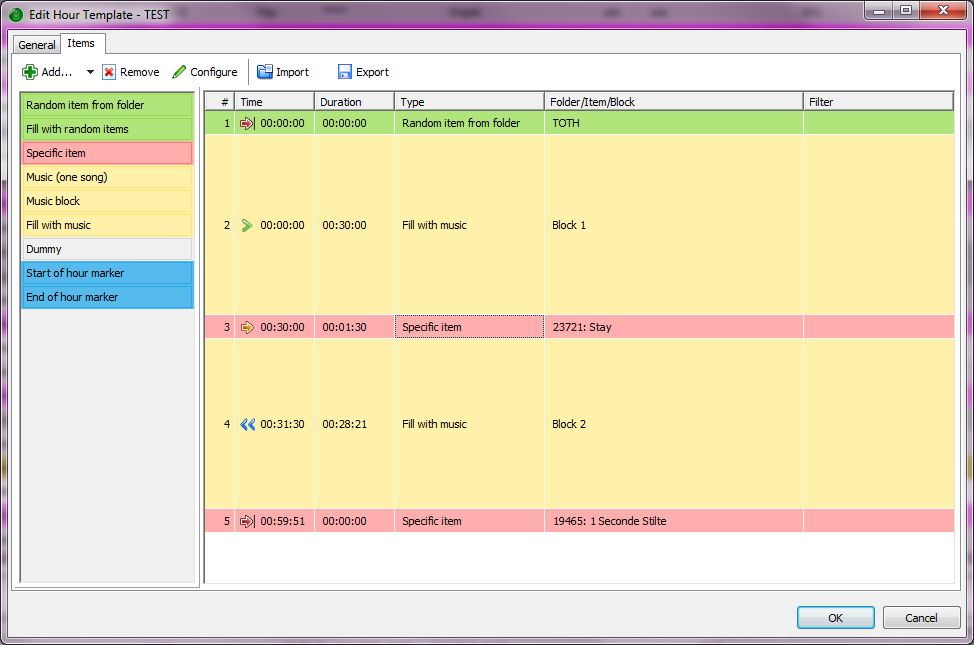
The “backtimed” option propagates the hard fixed time of the end of hour jingle to the begining of the backtimed-chain.
So the first item of music block 2 will have an implicit (hard) fixed time set, which is calcuated dynamically based on the duration of the items.
So you end up with two fixed time items in a row: the jingle and the first music item of block 2. Depending on the duration of the music block, the implicit fixed time of the music item will be before the fixed time of the jingle, and the jingle will be “eaten up”.
(Note that in the ma-007 screenshot, the 1:31 song is going to be played - but only for 1:15. So it actually depends on the duration of the music block if it is going to be played or not, and for how long.)
Possible solution:
Add a dummy item with soft fixed time 00:30:00 just before the jingle - to delimit the two music blocks. Then change the timing of the jingle from “soft” to “backtimed” so it will be part of the backtiming chain.
Now the dummy might be “eaten up” by the backtiming chain - but it’s not played anyway, so it doesn’t matter.
Thanks for your clear explanation, I got the picture.
So this is what I did: I’ve added a dummy item with a soft fixed time of 00:30:00 and moved the jingle to be the first item of Music Block 2. See screenshot 1. Basically this is the Hour Template I have used so far.
Scheduling is fine although some miscalculations do appear every now and then, see screenshot 2 where more songs are picked then will be played. Not a big deal but you might want to have a look at this one day.
Biggest problem again is the occasional underrun triggered by the hookcontainer script kicking in at 00:00:02. In the other Topic (https://www.mairlist.com/forum/index.php/topic,7553.0.html) you explained why this is happening which is also crystal clear but I have not been able to find a solution for this. Adding a dummy item of about 30 seconds as mentioned didn’t do the trick. Only thing that does help is removing the dummy item from every playlist by hand but that takes a lot of effort and time.
It would be great to have a dummy item for scheduling purposes only which will not end up in the actual playlist.
Another solution as you mentioned in the other Topic is a dummy which “floats” in the right spot.
At last one could think of a way not to have the need for a dummy anyway in between the two music blocks.
Your thoughts on this are highly apprectiated Torben!
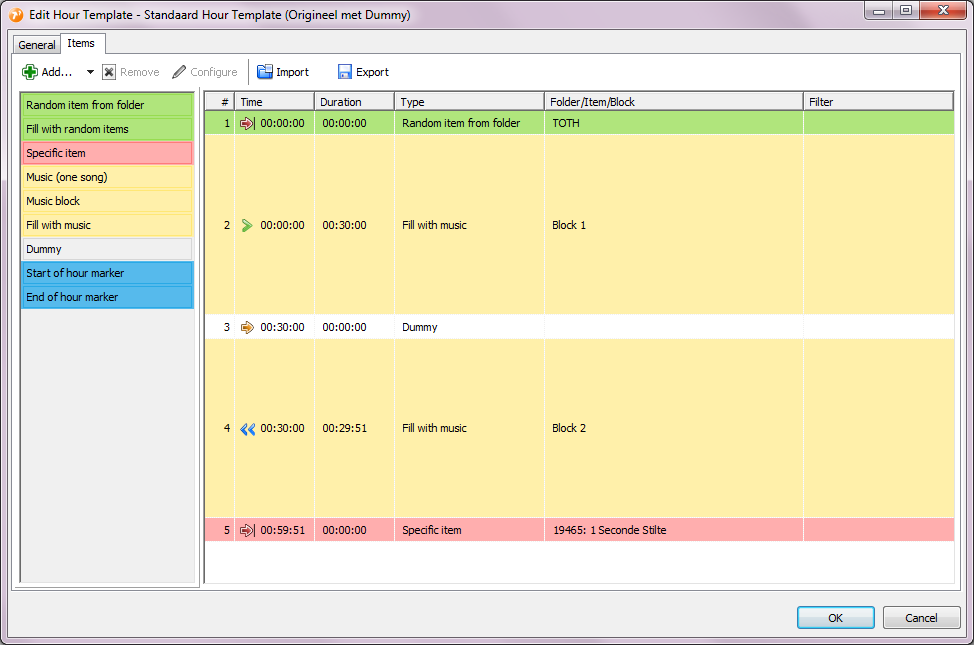
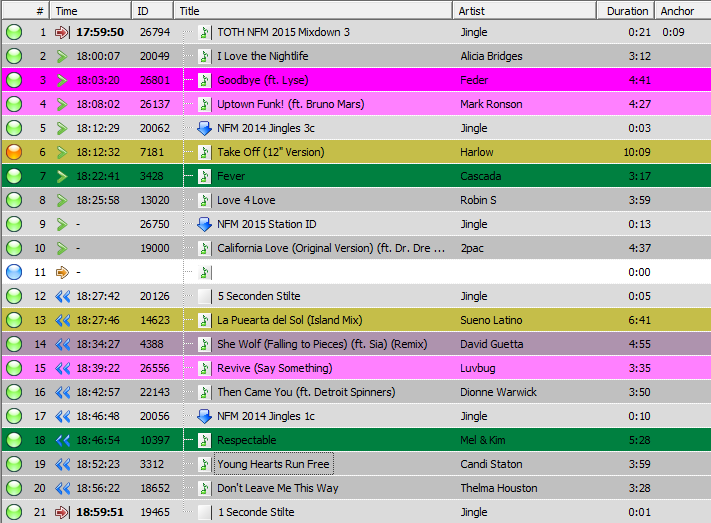
I just wondered if you have had time to have a look at this issue lately as I am still having the occasional underrun about once every day.
The way I see it, the easiest solution would be to have some sort of scheduling dummy which doesn’t end up in the playlist.
I’m also wondering if backtiming and “fill with music” is a sound combination. Suppose the dummy is an advertising block instead. Some of the advertisements might be eaten up by the backtiming chain.
Well, then just make the advertising block backtimed, and add an extra dummy - as outlined above.
The extra dummy is a cosmetic problem. In the long term, I think we can solve this by making “Fill with music” respect the estimated duration, so you can schedule e.g. a backtimed “fill 20 minutes with music” block.
Sorry Torben, but the dummy is not a cosmetic problem, it’s the reason of the underruns I’m experiencing in my playlists several times a day.
As explained in this Topic ((https://www.mairlist.com/forum/index.php/topic,7553.0.html), the hookscript in combination with the dummy will result in an underrun every now and then. (as explained clearly by yourself in reply #3)
I need the dummy though in order to be able to backtime the second fill with music block. When I remove the dummy by hand after scheduling, all is well. But that’s a rather time-consuming exercise wihich I would like to avoid.
When the “Fill with Music” block would respect the estimated duration, the underrun problem would be solved indeed 
Ok, so you can use a script as a workaround:
var
  i: integer;

begin
  CurrentPlaylist.BeginUpdate;
  try
    i := 0;
    while i < CurrentPlaylist.GetCount do
      if CurrentPlaylist.GetItem(i).GetTitle = 'Dummy' then
        CurrentPlaylist.Delete(i)
      else
        i := i + 1;
  finally
    CurrentPlaylist.EndUpdate;
  end;
end.
Removes all items with title “Dummy” from the playlist. You can run this along with your hook script, or as the postprocess script in the Load database playlist action.
Works as a charm after a little modification. The Dummy file has not the “Dummy” Title in it, so I changed the Title to ‘’ (empty), and now all is well! Thanks Torben!