HELLO everyone! This is primairly for users who are familiar with Radioboss software.
I am trying to figure out if we can use mAirlist for our needs and replace Radioboss since it is quite expensive, I would not want to invest into something I won’t be able to utilize succesfully.
mAirlistt is really great and complex and very versatile.
I need to determine which Radioboss functionality could be replicated in mAirlist and which can’t.
Right now I am stuck at importing DB.
RB Database was converted to CSV but for some reason all entries came back as DUMMY after the import. I do not understand why. If I load separate m3u8 files, they load correctly and playable.
Here are certain things that we do with RB. Could the same be achievable with mAirList?
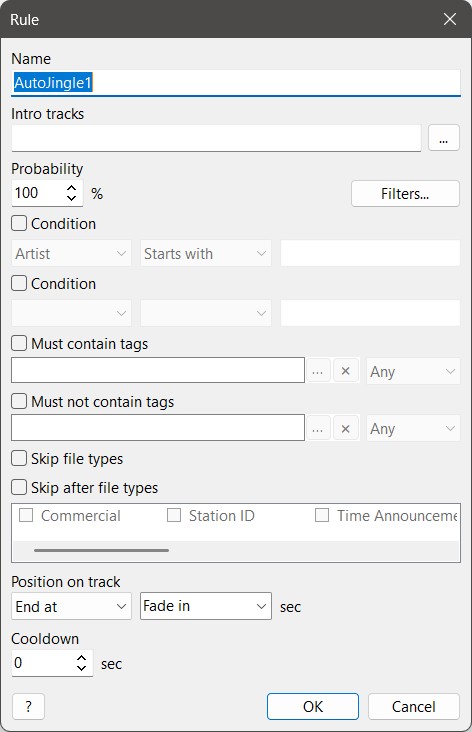
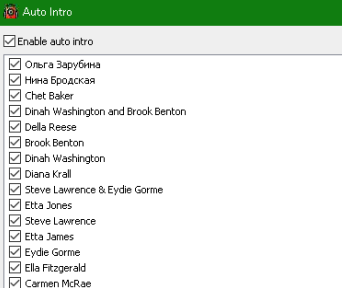
RB has a feature called AUTOINTRO: we use it for auto DJ announcements on songs with ramp1 set. It checks every certain number of minutes (set), and if a song has ramp1 available, it plays the announcement.
Playlist generation. We have it every hour. I have playlists for each category, and the generator takes 1 song from each to fill the clock.
At certain times the scheduler loads top-of-the-hour playlist and different short-form programs.
During live air shows, RB records them.
RB has several tabs for different playlists (programmable) in addition to the main playlist, and various work zones for additional bells and whistles (also programmable).
We have a utility (remote control) that can connect to RB via the internet and activate mic on/off, see its status, see what is being played, etc. That is via API. I wonder if those commands could be set in your software.
Even though RB has the database functionality, we store all the information inside the MP3 files in tags. As far as I understand, mAirlist operates only via database.
I am not really familiar with RB, but since some of the presenters at our radio station have used it in the past (some of them have switched to mAirList) I used an RB demo to understand what they were talking about.
Indeed, the price of mAirList is better, especially calculating costs in the future. Additionally, mAirList is a product growing with your hardware (e.g. interacting with some mixers), where RB may come to an end.
However, there are some functions in RB I would like to see in mAirList, but this is no reason for the price difference.
Many wishes can be realised using our scripting.
Lets have a look to your questions.
Not sure how it works, but I’m afraid this is not available in mAirList.
However, some folders in the database can have an intro or it is used in the hour template of the database. Concerning the ramp, I think this can be solved via a script.
No problem. Using the database, you have hour templates, music templates and transition templates in combination, together with a powerful schedule.
The so-called “Mini Scheduler” helps you to generate playlists following your personal wishes.
Same as 2; creating and adding playlists TOTH can be done by (regularly) events.
mAirList is able to figure out if a playlist is already loaded and skips this, so double-added playlists can be avoided.
I had to learn that this is no automatic function in RB and I was wondering.
In mAirList you can add an encoder called “record to file”. So you can start recording your show automatically when you start streaming - and it stops at the end of the show the same way.
Simply start the encoder, and both (active) encoders will start without separate actions from the presenter.
You can define as many playlists as you want - when it makes sense.
The other “work zone” seems to be our cartwall, where you have many possibilities for configuring and saving presets.
Next question, please - another member of the community may help?
No, the database isn’t strictly necessary, but we do recommend using it. Of course, you can drag and drop any audio file into the playlist, but on the long run, using the database is more efficient for a variety of reasons.
mAirlist supports multiple ways to do remote control:
The REST API Feature exposes a HTTP-API that can be used for bi-directional communication (getting status information & executing actions). This is probably the easiest to integrate within any custom software/internal webpage, but it requires the Professional Edition of the software.
The TCP Server Feature exposes a TCP-port that can be used for executing remote control commands. It can be used to execute remote actions/commands, but it does not support pulling data from the playout instance. This feature is available in the Advanced Edition and above.
You can still write a custom script to send information to a remote server, if you want bi-directional communication. The scripting engine in mAirlist is very powerful and allows you to control and view almost all functionalities within the mAirlist application.
It appears similar to mAirList 8’s AutoMix feature, but probably not exactly the same.
In addition to what @UliNobbe already proposed, also note the “Sub-playlist” feature that allows you to schedule more than one playlist per hour. So for example, you could have a “scratchpad” playlist along with the actual on air playlist.
I started the RB demo again and found the Auto Intro feature in the Tools menu.
I’m actually not sure what it’s really made for. It seems a bit complicated.
There is a YouTube video by a private individual in German, but after watching it, I was more confused than before (unfortunately, he is not very good at explaining things).
@TorbenYou can download the demo and use it for up to 150 starts; each session can last a maximum of 5 hours. I know you’re busy, but it can sometimes be helpful (it was helpful for my radio station to explain how some features can be realised with mAIrList).
Radioboss has an archive recorder feature and throught the scheduler you can set the recording time and off time. It is very conveniant as we do not need 24/7 recordings
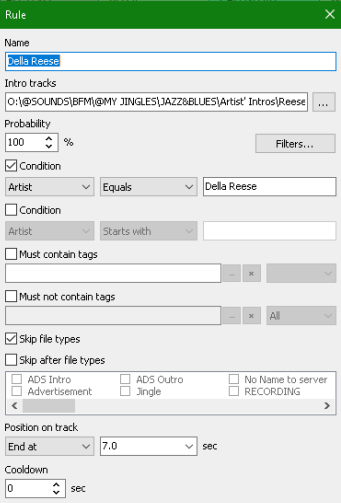
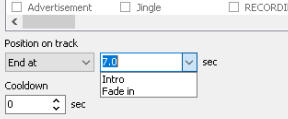
When the playlist conditions are met, the assigned intro file plays automatically.
You don’t need to do anything after setting it up.
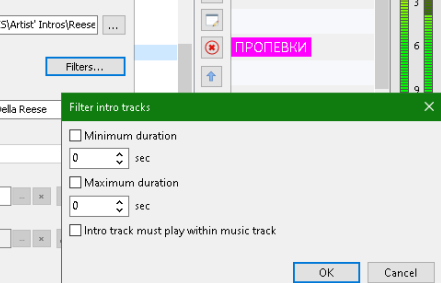
For example: there’s a Della Reese track in the playlist with a 20‑second ramp1. If that track matches the criteria, the voicetrack will replace its ramp1.
This particular setup doesn’t use the ramp at all — it’s configured to trigger the intro after 7 seconds of the file have elapsed.
I hope you undertstand my explanation
If you want to go over each funcrion, we could do that.
The Professional Version has a Feature called File Recorder, that can Schedule recordings or respond to events. One of my customers is utilizing this feature for anything produced live in the studio. Triggered by a Control element on loading the playlist and trigger for stop by a different element.
There is an entire product doing nothing else but recording, called Audio Logger
One general thought: Migrating from one software to another will always cause issues somewhere. The thing is, at some point you have to make concessions. So you will have to weigh up the benefit of software M’s attractive pricing against the accustomed functionality of software R. Who knows, maybe the different functionalities will lead to superior workflows over time. Claiming a 1:1 mirror will yield a disappointing outcome.