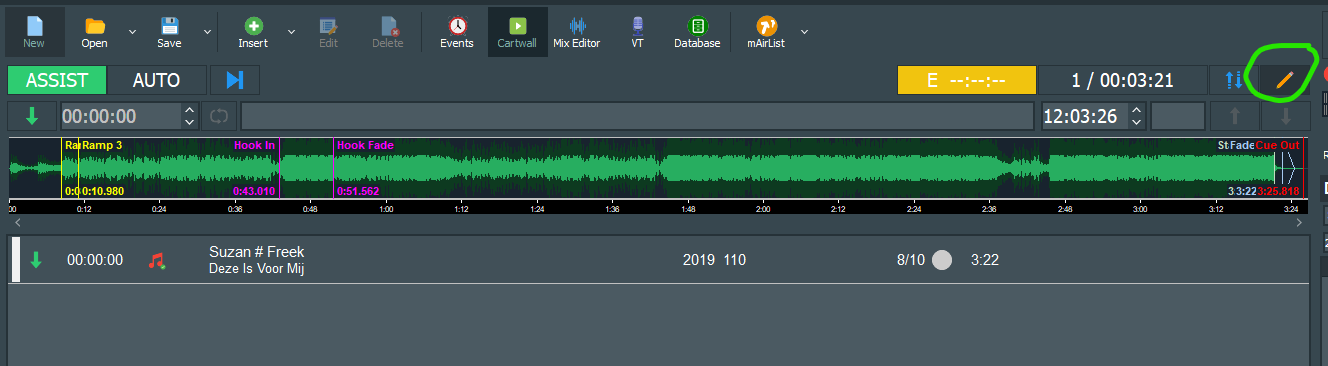
this is not possible. But I’d prepare (and do for my stations) the elements for automated flow because if your presenter isn’t unconscious he could edit the cue points on the fly in seconds: Theres the little pencil symbol on top of the playlist.
Select an element and it will show all cue markers and the end points (fade-out, cue-out or start next) and make them editable on the fly, without opening the element in the editor.
These changes are only temporarily for the playlist use and will not be saved in the database element itself.
Your other suggestion
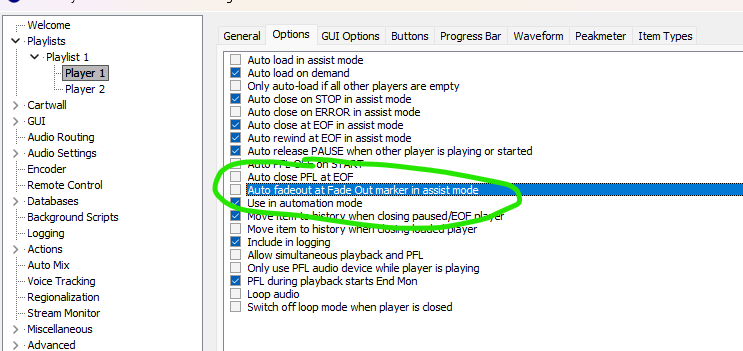
This is already possible in mAirList by deactivating this option in the configuration, that can be set for every player autonomously:
Hi Stefan and Tondose, Thanks for your quick reply.
@Tondose, a lot of our DJ’s do link the songs in ASSIST mode. You can do it manually and it is used extensively. But, if you see no need for this feature, then that’s also an answer. I can live with that, since there are some workarounds as proposed by Stefan.
@Stefan_Hillen I wasn’t aware of the pencil option, so this was an eyeopener. Moreover I think the player option ‘Auto fadeout at Fade Out…‘ is exactly what we’re looking for. Although I didn’t see any difference when I enabled or disabled this option. Probably I’m using it in the wrong way, I still have to sort it out. Anyways, we can proceed now.
For example: Playing a song with a live record of a concert. Normally for the Automation you would have cued the fade-out right after the music ended where mAirList would start the next song in AUTO mode.
In ASSIST it would not start the next song but still fade-out the song at the marker anyways.
With this option disabled, the host could use all the cheering and clapping beyond the fade-out too to let it play in the background until the element has been finished.
Please don’t forget that this is a setting per player, so every player must be changed in the configuration.