Layout- und Skin-Probleme

Hallöchen zusammen,
ich habe wirklich alles nur erdenkliche probiert, aber ich finde einfach keine Lösung:
Ich würde gerne die Hintergrundfarbe von Bildschirmobjekten, konkret eine Encoder-Steuerung und ein PNG-Bild (mit Transparenz), ändern.
Vorgehen wie immer: Über die skin.ini [ScreenObject0] und [ScreenObject1] Anpassungsversuche mit Color, Background, BackgroundColor und WindowBackgroundColor.
Gibt es die Möglichkeit, diese Farben anzupassen? Wenn ja, wie?

Außerdem ist mir folgendes aufgefallen: Sobald ich in der Konfig das “Gesamtlänge aller Titel anzeigen”-Feld deaktiviere, erscheint der im Anhang zu sehnde Kasten, den ich einfach nicht wegbekomme. Ist das ein Bug oder ein Fehler meinerseits?
Zuletzt noch eine Sache zum Encoder-Objekt: Ich wollte das Encoder-Objekt einen Layer über der Playlist überlappen lassen. Sieht im Layout-Designer auch super aus, aber sobald ich mAirList in Betrieb nehme, verschwindet das Objekt zum Teil hinter der Playlist, obwohl es ja eigentlich davor liegen sollte. Auch hier: Bug oder Anwenderfehler?

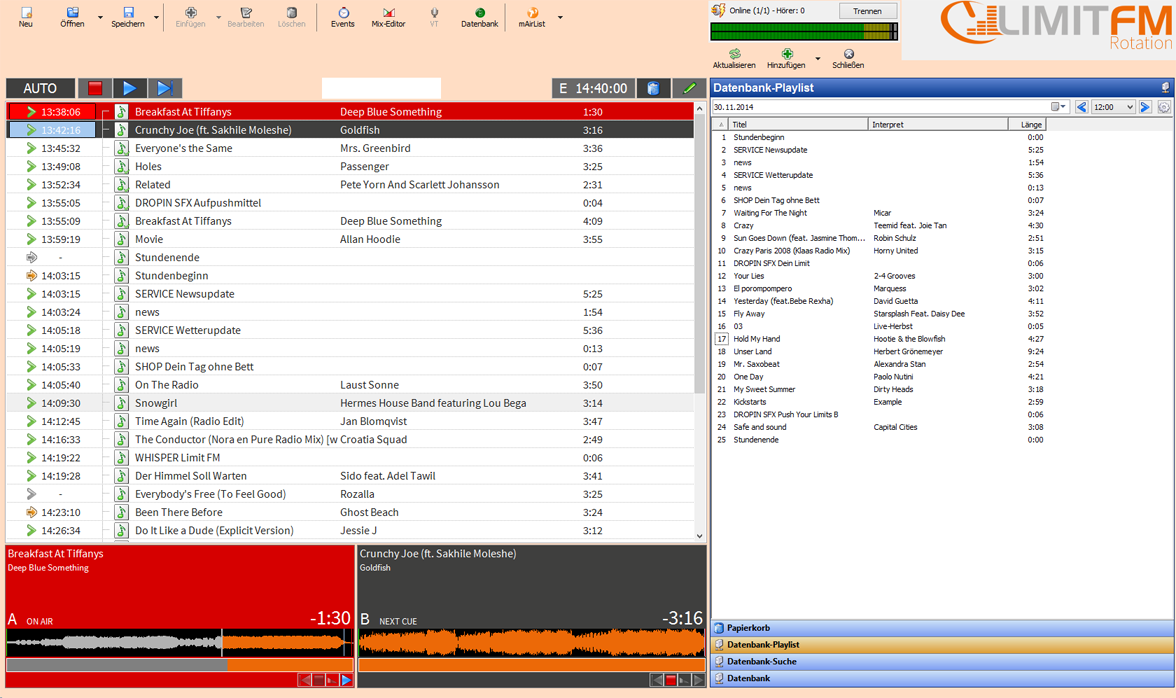
Vorab schonmal Danke und liebe Grüße
Johannes


weiß.jpg

Häng doch bitte mal deine aktuellen layout/skin-Dateien hier an.

Here we go:

Skin


[MainWindow]
ButtonActiveColor=#00b204
ButtonInactiveColor=#f0f0f0
ButtonActiveFontColor=#FFFFFF
ButtonInactiveFontColor=#000000
ButtonActiveHoverColor=#3b3b3b
ButtonActiveHoverFontColor=#FFFFFF
ButtonInactiveHoverColor=#3b3b3b
ButtonInativeHoverFontColor=#FFFFFF
Color=#ffddc4

[Toolbar]
Color=#ffddc4

[ScreenObject0]
Color=#ffddc4

[ScreenObject1]
Color=#ffddc4

[Browser]
WindowBackgroundColor=#ffddc4

[Player]
TimeFontColor=#FFFFFF
TitleFontColor=#FFFFFF
ArtistFontColor=#FFFFFF
StateFontColor=#FFFFFF
NameFontColor=#FFFFFF
PFLColor=#FF6600
EmptyColor=#3f3f3e
LoadedColor=#696868
NextColor=#3f3f3e
PlayingColor=#d60000
PlayerColor=#696868
FlashEOFColor=#ec6907

PlayingTimeFontColor=#FFFFFF
PlayingTitleFontColor=#FFFFFF
PlayingArtistFontColor=#FFFFFF
PlayingStateFontColor=#FFFFFF
PlayingNameFontColor=#FFFFFF

ButtonSize=20

NameFontName=Source Sans Pro
NameFontStyle=0
NameFontSize=18

ArtistFontName=Source Sans Pro
ArtistFontStyle=0
ArtistFontSize=10

TitleFontName=Source Sans Pro
TitleFontStyle=0
TitleFontSize=12

StateFontName=Source Sans Pro
StateFontStyle=0
StateFontSize=10

TimeFontName=Source Sans Pro
TimeFontStyle=0
TimeFontSize=22

ProgressBarHeight=20
ProgressBarBorderColor=#FFFFFF
ProgressBarRemainColor=#ec6907
ProgressBarRampColor=#FFFF00
ProgressBarColor=#ec6907

WaveformEmptyColor=#3f3f3e
WaveformColor=#f5c099
WaveformActiveColor=#f5c099
WaveformInactiveColor=#f5c099
WaveformInactiveBorderColor=#FFFFFF
WaveformBackgroundColor=#000000
WaveformNormalColor=#ec6907
WaveformFocusedColor=#f5c099
WaveformCueColor=#FFFFFF
WaveformPlayedColor=#b2b2b2

[Playlist0]
WindowBackgroundColor=#ffddc4
ToolbarBackgroundColor=#ffddc4
FontName=Source Sans Pro
FontStyle=0
FontSize=12

ButtonActiveColor=#3f3f3e
ButtonInactiveColor=#696868
ButtonActiveFontColor=#FFFFFF
ButtonInactiveFontColor=#FFFFFF
ButtonActiveHoverColor=#696868
ButtonActiveHoverFontColor=#FFFFFF
ButtonInactiveHoverColor=#3f3f3e
ButtonInactiveHoverFontColor=#FFFFFF

BackgroundColor=#FFFFFF

LoadedRowColor=#696868
LoadedFontColor=#FFFFFF

PlayingRowColor=#d60000
PlayingFontColor=#FFFFFF
SelectedColor=#ec6907
SelectedFontColor=#FFFFFF
NextRowColor=#3f3f3e
NextFontColor=#FFFFFF
HistoryRowColor=#919191
HistoryFontColor=#FFFFFF
FocusedSelectionColor=#ec6907
FocusedSelectionBorderColor=#ec6907

Layout

[Browser]
Left=1008
Top=60
Width=670
Height=925
ZOrder=0

[Player0_0]
Left=4
Top=778
Width=500
Height=205
ZOrder=1

[Player0_1]
Left=507
Top=778
Width=500
Height=205
ZOrder=1

[Playlist0]
Left=4
Top=108
Width=1003
Height=668
ZOrder=0

[Toolbar]
Left=1
Top=1
Width=984
Height=59
ZOrder=1

[ScreenObject0]
Left=1285
Top=-15
Width=449
Height=101
ZOrder=1

[ScreenObject1]
Left=1009
Top=1
Width=274
Height=60
ZOrder=1

Ergebnis siehe Anhang.


Screenshot.png