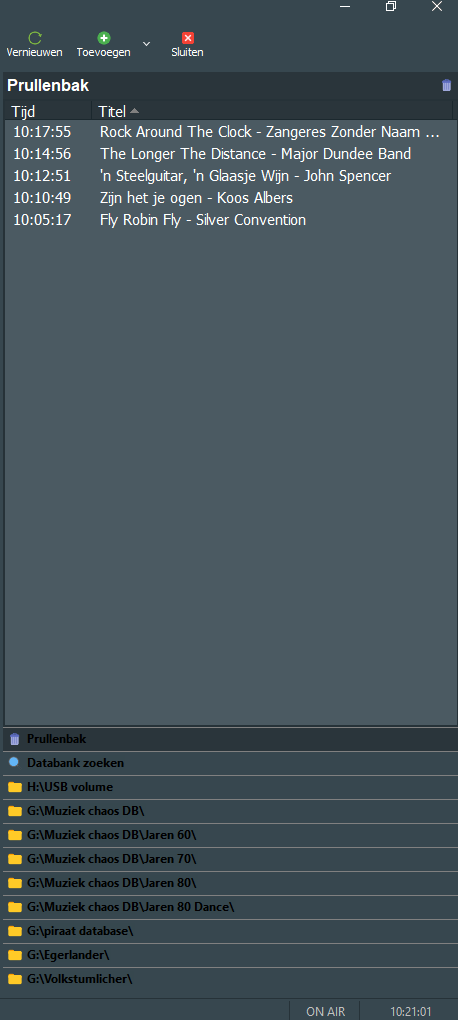
kleuren van de tekst aanpassen in de verkenner. en dan in de dark mode.
ik heb aan de onderkant verschillende links naar schijven aangemaakt, alleen blijft de tekst zwart en ik zou deze graag naar wit willen hebben. weet iemand hoe?
kleuren van de tekst aanpassen in de verkenner. en dan in de dark mode.
ik heb aan de onderkant verschillende links naar schijven aangemaakt, alleen blijft de tekst zwart en ik zou deze graag naar wit willen hebben. weet iemand hoe?
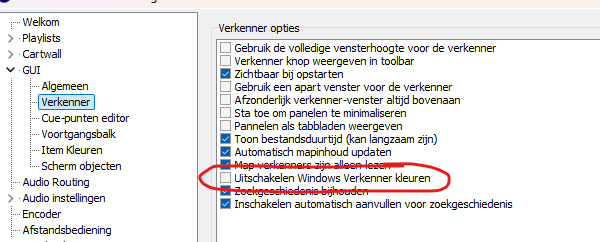
Stefan, dit had ik al gedaan, maar ze blijven zwart. best wel jammer, maar in de donkere modus zie je de tekst amper.
in het bovenste deel zijn ze wel wit, maar deze kun je ook niet veranderen. Of ik moet een fout in de skin ini hebben
Het zou erg handig zijn als je ons je skin.ini-bestand zou kunnen laten zien, zodat we je kunnen helpen 
Ik zou de achtergrond dan lichter maken dan kan je de zwarte tekst wel lezen.
Zie mijn video’s op zoals deze https://www.youtube.com/watch?v=sFF5uLdfUIo&t=85s
Nou die gaat over alles maar niet over de kleur aan te passen.
[MainWindow]
Color=#808080
BackgroundColor=#edeceb
ToolbarBackgroundColor=#edeceb
WindowBackgroundColor=#edeceb
[Toolbar]
ShowSeparator0=on
ShowNew=on
ShowOpen=on
ShowSave=on
ShowSeparator1=on
ShowInsert=off
ShowProperties=off
ShowDelete=on
ShowSeparator2=on
ShowEvents=off
ShowCartwall=on
ShowSeparator3=on
ShowAbout=on
ShowMixeditor=on
ShowVoicetracking=on
ShowBrowser=on
[Browser]
FontName=
FontColor=#edeceb
FontSize=11
FontStyle=#edeceb
color=#edeceb
[Playlist]
UseBlendedSelection=on
FontName=Calibri
FontSize=14
PlayingRowColor=#6E7F89
PlayingFontColor=#e69e19
PlayedFontColor=#00ffff
Columns=player,Time,Peakmeter,Icon,Title,Ramp,Duration, Link
TitleDisplayMode=VSplitArtistTitle
RowHeight=45
RowColor=#333333
ProgressBarRamp1Color=#ff0000
[Player0_0]
FontColor=#faf5f2
Color=#ff8133
Loadingcolor=#000000
BorderColor=#000000
TitleFontSize=16
ArtistFontSize=16
PlayingArtistFontColor=#e69e19
LoadedArtistFontColor=#e69e19
NextArtistFontColor=#e69e19
PlayingTimeFontColor=#00ffff
PlayingColor=#1F86B5
PlayingStateFontColor=#ff0000
NextStateFontColor=#ff8804
NameFontColor=#faf5f2
TitleFontColor=#faf5f2
ArtistFontColor=#faf5f2
TimeFontColor=#faf5f2
StateFontColor=#faf5f2
EmptyColor=#000000
NextColor=#333333
LoadedColor=#333333
PlayingColor=#1F86B5
PausedColor=#0000ff
WaveformNormalColor=#00FF00
WaveformBackgroundColor=#000000
WaveformInactiveColor=#000000
WaveformEmptySpaceColor=#ffffff
WaveformTimelineDividerColor=#ffffff
NameFontName=Disc
NameFontSize=45
NameFontStyle=1
TimeFontName=Digital-7 Mono
TimeFontSize=25
TimeFontStyle=0
StateFontName=Disc
StateFontStyle=0
StateFontSize=25
ButtonBorderColor=#ff8133
ProgressBarHeight=0
[Player0_1]
FontColor=#faf5f2
Color=#ff8133
Loadingcolor=#000000
BorderColor=#000000
TitleFontSize=16
ArtistFontSize=16
PlayingArtistFontColor=#e69e19
LoadedArtistFontColor=#e69e19
NextArtistFontColor=#e69e19
PlayingTimeFontColor=#00ffff
PlayingColor=#1F86B5
PlayingStateFontColor=#ff0000
NextStateFontColor=#ff8804
NameFontColor=#faf5f2
TitleFontColor=#faf5f2
ArtistFontColor=#faf5f2
TimeFontColor=#faf5f2
StateFontColor=#faf5f2
EmptyColor=#000000
NextColor=#333333
LoadedColor=#333333
PlayingColor=#1F86B5
PausedColor=#0000ff
WaveformNormalColor=#00FF00
WaveformBackgroundColor=#000000
WaveformInactiveColor=#000000
WaveformEmptySpaceColor=#ffffff
WaveformTimelineDividerColor=#ffffff
NameFontName=Disc
NameFontSize=45
NameFontStyle=1
TimeFontName=Digital-7 Mono
TimeFontSize=25
TimeFontStyle=0
StateFontName=Disc
StateFontStyle=0
StateFontSize=25
ButtonBorderColor=#ff8133
ProgressBarHeight=0
Dat weet ik maar je ziet dat de achtergrond lichter is waardoor je de zwarte tekst beter kunt lezen. Dus het is zeker wel mogelijk het aan te passen zodat het leesbaar is.