I have achieved this through the Transitions Templates. Let me give you an example:
I have this Christmas Jingle of Michael Bublé and this has to be played before every Christmas song of Michael Bublé. The jingle resides in a virtual subdirectory: jingles -> Bublé and is the only jingle in this folder. All of the Christmas Songs of Michael Bublé are all from the same imaginary Christmas Album: e.g. Christmas with Bublé.
In the transition template make sure this is the first line of all available rules: leave the first entry empty, the second should mention this imaginary album, set the Number of Subsequent Music Items to “1”. The folder should point to the virtual directory where the jingle resides. Now every time a Christmas Song of Bublé is played, mAirlist will insert the jingle in front of it.
Unfortunately, not all the jingles involved can be placed in one virtual subdirectory. This is due to the nature of the jingles. Besides that, I am not using Transistions Templates (only Hour Templates).
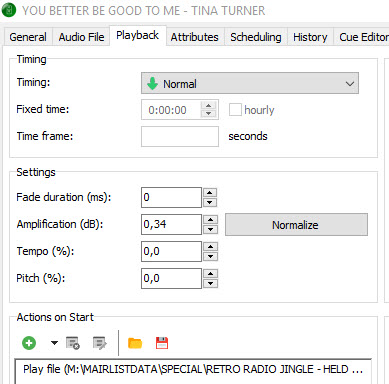
I am still very curious how this feature “Actions on Start” is supposed to act. If my need is fulfilled by that feature, I will be very satisfied.
I take it you know that the jingles can be in more than one virtual directory?
I tried to achieve this in the same way as you are trying, but I couldn’t make this work. Maybe did something wrong but then I decided to try a different approach and that works really well as described above. Using the Transitions Templates works rather well also, takes some time to get used to it though and it also takes some time to make it work the way you want it. But once that’s done it’s much easier to make changes when needed.
Generally, “Insert/Play file” etc. will not work well as “Actions on Start”, as you already noticed. It was rather meant to be used with Events, in the old days where we did not have mAirListDB and the Mini Scheduler.
I would propose that you try to solve this on scheduler level. The use of transition templates is actually a very nice idea - well done, Lukeman!