I have the need to change the font color in the playlist. Only the font color. I currently seems not to have a skin.ini file available in Config map.
Do I need to make a skin.ini file in order to change the fontcolor (how?) or is there a easier way to achive this?
https://www.mairlist.com/dokuwiki/reference:skin.ini_reference
Can someone please help with skin.ini setting? Trying to change the Fontcolor of the upcoming songs to White (instead of black). See attachment.
Made a skin.ini file and placed this in mAirList config folder. Current content:
[Fonts]
Fontcolor=#0000FF
No luck.
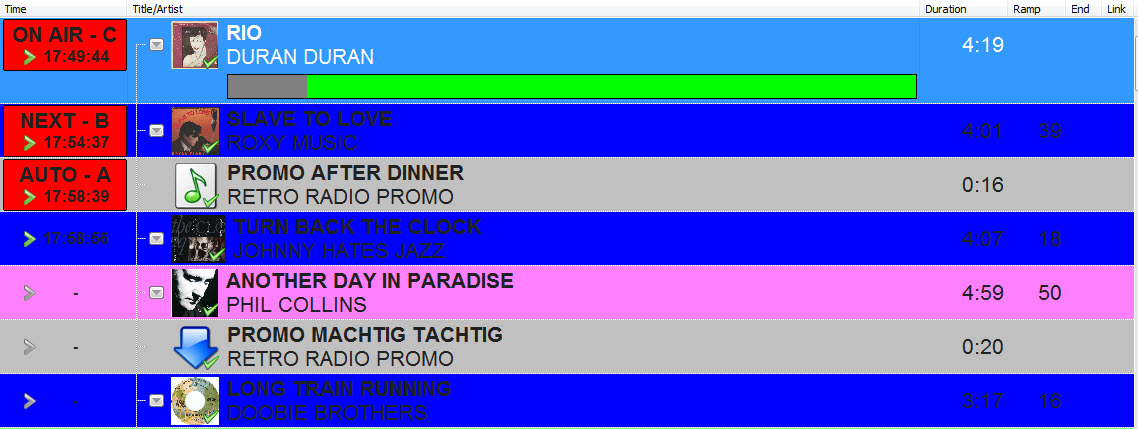
Torben
3
Section name should be “[Playlist]”, not “[Fonts]”.
Then try “NextFontColor=…”.
No luck. Just to be clear: I want ALL (Title and Artist) the fonts of ALL the upcoming songs in the playlist to be white (#0000FF).
Torben
5
Then just “FontColor=…”? Mind the correct section name.
Allright! I managed to get the fonts white (and the current playing rowcolor red) 
At last, now I want the font color of the upcoming Jingle files (Artist and Title) and News files to be black.
I tried:
[Alternate]<Loaded><Jingle><News><File><Title><Artist><Level 0>FontColor=#060000
No luck. Suggestion anyone?
JingleFontColor=#000000
NewsFontColor=#000000
Have a look at the Wiki. All the skin.ini possibilities are listed there. Best luck.
Cheers, Alec M