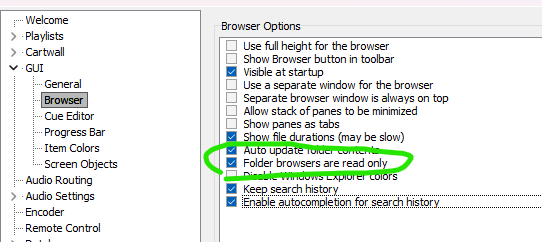
When you right click on a folder in the Folder Tree in the Browser, the right click menu of Windows Explorer appears. This behavior is in mAirlist 8.0.6 (build 6033) and not in mAirlist 7.4.10 (build 5865).
With the Windows Explorer menu, you can delete files or folders. This should not be possible in a browser.
Hi Stefan, with the context menu you are able to remove files and folders. This should not be possible when the option ‘Folder browsers are read only’ is checked.
To reproduce the issue:
Option Folder browsers are read only is checked
A folder is added in the Browser using the option ‘Add Folder Tree’
Right click opens the Explorer context menu
Executing ‘delete’ on a file or folder deletes the choosen item.
Before mAirList 7.1, the presence of the popup menu was controlled by a global “feature” option in the config.
Starting with v7.1, it is controlled by the user permissions which you can set on the “Passwords” page in the config, and it can set on a per-role level.
It’s still missing a “noone/disabled” setting. I will add that.
Uploaded snapshot 6036, please try if it works now. There is a new “Noone” setting for the permissions, but the read-only setting for the browsers will now also imply that the popup is disabled anyway.
When the option GUI > Browser > ‘Folder Browsers are read only’ is checked, the selected item in the treeview cannot be dragged and dropped into a playlist.
When the option is unchecked (and the context menu is showing), the selected item in the treeview can be dragged and dropped into a playlist.
Apparently the drag&drop is also disabled with disabling the context menu / read-only.