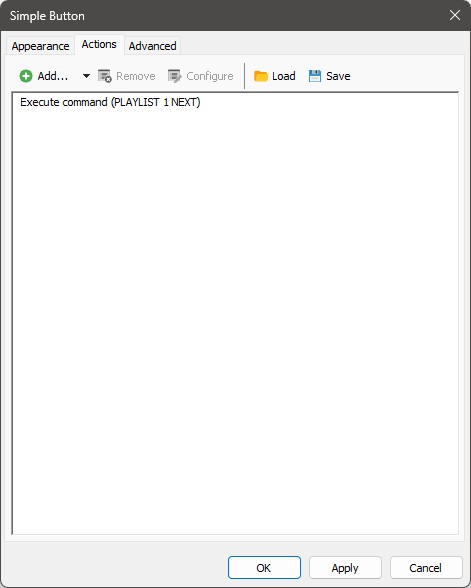
Hi guys,
I’m trying to create a custom button that should do the following with a single press:
Fade out the currently playing item in the player
The fadeout works correctly, but the problem is that the next item only gets loaded into the player, and does not start playing automatically.
So the result is:
current track fades out
My setup:
Player: 2-1
Commands I tried:
PLAYER 2-1 FADEOUT
but it still only loads the next item (after the fadeout) without starting playback.
Is there a way to make the next playlist item start automatically after the fadeout using a single button?
Thanks!
How about
PLAYER 2-1 FADEOUT; PLAYLIST 2 NEXT; PLAYER 2-1 START
?
To me, your solution seems complicated.NEXT button on the playlist and it worked fine on its own.
The corresponding remote command is:
PLAYLIST 1 NEXT - Execute the NEXT function for ASSIST mode.
(from reference:remote_control_commands [mAirList Wiki] )
You should change the 1 to 2 for Playlist 2.
It seems there is no reason for the command chain.
So that is what he says he tried before …
In my clean (fresh) installation of v8 it works without any problems.
Working fine with v8.0.6.
@imilkovic : Sure the respective playlist is No. 2?
Here are the button settings and heres the video you can check to see whats happening with that settings.
Did you read the posts by @UliNobbe ? With the command
PLAYLIST 1 NEXT
(or No. 2 in this case) it should work and it does work in Uli’s and in my setup.
Did you read my question:
EDIT
You need the action Execute command () and then the corresponding command from the drop-down-list. Please follow the drop-down from mAirList; this will lead you through the process.
It seems that the Execute command () does not accept command chains.@Stefan_Hillen @Torben am I right with trhis thought?
Okay I understand. You use the “Simple Button” screen object to execute the command.
I tested this one:
… and it works like a charm.
Thanks Uli, that was the first thing ive tried but this is what i got.
Is it possible that there are two blank spaces before the number of the playlist ( 2 instead of 2)?
I can’t see it exactly and I don’t know if this would have an influence.
No there arent any extra spaces between. The button “starts” the next element only when the player is fully stopped and loaded.
The function i want to make on custom button is the same as the one in the playlist control bar
Please try launching PLAYLIST 2 NEXT directly via the Remote Console. (So we might rule out any influence from the button itself.)
Since im unable to use other remote than local hotkeys option ive tried that and i gettin the same thing.
The Remote Console is a tool for evaluating remote control commands by directly launching the respective command. Please try that.
Mysterious. But the jingles are great.
Don’t laugh at me, please. But would you mind turning off dark mode for a try? (There had been issues before with that.)
No change despite the mode.