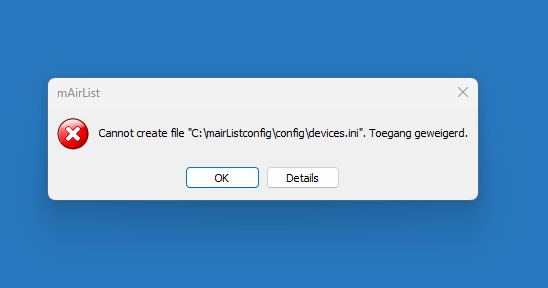
This morning I did a new install on a new PC with W11.
Can’t get rid of this error
cannot create file "c:\ProgramData\mairlist8.x\config\postition.ini
Can someone help with this ?
Jos
This morning I did a new install on a new PC with W11.
Can’t get rid of this error
cannot create file "c:\ProgramData\mairlist8.x\config\postition.ini
Can someone help with this ?
Jos
Hi Jos, did you change any paths by hand? Or did you just manually typed the error message for this topic from the screen, as there are some typos in there…
The legit path would be “C:\ProgramData\mAirList\8.x\config\position.ini” for the installation
That’s a type error.
Jos
Okay. This sounds like a general windows problem.
I did the install with Admin rights, manually I can go to the (hidden) path C:\ProgramData\mAirList\8.x\Config. I also created an config directory in the main mAirlist directory and deleted the hidden path, but that didn’t worked out also. The main path has no special rights.
In my private studio in Spain I also had this issue, don’t know how I fixed it overthere..
Jos
Maybe the key is HOW you did the install.
Fixed that the mAirlist is looking is the directory that I want and made, still the error about not able to write there.
Can you confirm that you used the regular setup to install mAirList?
Not the zip distribution?
Yes, the regular setup was used
I removed mAirlist again, did the setup again and changed the security settings for the user and it looks that it is working now.