When doing an DB search for: Born S, I get results of every title with Born and S in it…
Is this a bug or a problem with my settings?
See Attachment.
Regards,
Ferry
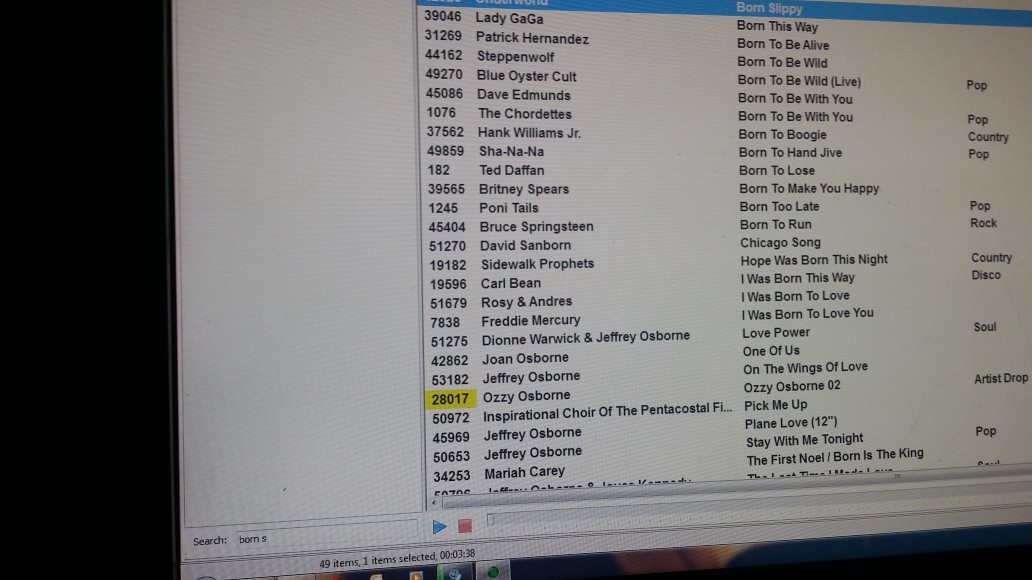
When doing an DB search for: Born S, I get results of every title with Born and S in it…
Is this a bug or a problem with my settings?
See Attachment.
Regards,
Ferry
Right-click the search field and uncheck “Advanced search”.
Unchecking does not give any results.
Also the option is not remembered when exiting the DB.
Version used: 5.3.7. Build 3224
Regards,
Ferry
Issue with the settings not being restored is resolved in b3225, thanks.
About the search - what do you think should have been returned when you searched for “Born S”? And what should have not?
Will try the new build, thanks!
As for the result, I expected “Born Slippy” would appear (just as it did before but can’t remember witch build)
So anything in the exact phrase should come up.
Setting is remembered now.
But I can type what I want, on everything I get 0 Results
Regardless of the Advanced Search option?
With Advanced de-selected I get 0 Results.
With advanced on, let say searching for Queen, I get everything with the word Queen.
Now I want to search for Queen a Kind of Magic (so I type Queen a) Everything with Queen and the letter A is showing
Typing queen a ki Gets me also The Eurythmics - The King & Queen Of America
Hope you get my point here.
Ok, there was another bug in the non-Advanced search. Try b3227 please.
Generally, “Advanced Search = off” means “exact match”, so the search term must be present exactly as typed in the artist, title, etc. field.
Whereas “Advanced Search = on” means that all words are treated separately, and the DB will return all items where each word is present in at least one of the fields. (Technically, the search is performed separately for each word, one by one, and then the intersection of the results is returned.)
That is working much better 
Only exact phrase on artist and partial on title does not work…
However, I imagine that is difficult to implement.