Hi,
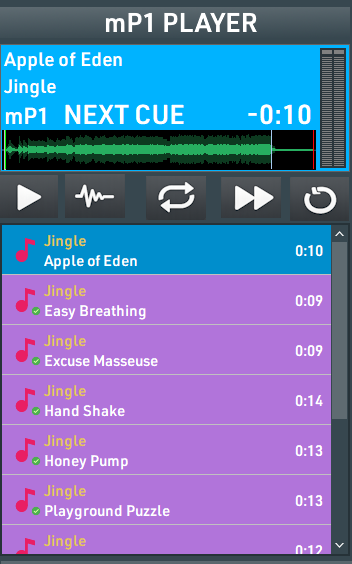
In mAirList 7.4 I created a custom control strip for my static player using PNG images.
At the moment they are just Image objects, so functionally they are only pictures. I would like them to behave like real player buttons with proper state feedback.
What I am trying to achieve:
Custom PNG icons (Play, Loop, Fade, Next, Reset)
They should function like real buttons
LOOP should visually indicate when loop is enabled
START should visually indicate when the player is playing
Other buttons can stay momentary
Right now, if I use only Image objects, they are just static graphics.
If I use Extended Buttons on top, I can trigger commands, but I cannot properly bind them to the real player state (Player[1].Status or Player[1].Loop) without using external scripts.
My question is:
What is the correct way in mAirList 7.4 to create custom PNG player buttons that:
Execute player commands
Reflect the real player state (active/inactive)
Without switching back to the default built-in player buttons
Is this only possible via a full custom layout skin (PlayerButton type with ImageOn), or is there a cleaner GUI-based method?
Any guidance would be appreciated.
Thanks!