Suddenly I started getting this error on MailList startup for no reason.
I have not changed anything.
I do not use ASIO for anything.
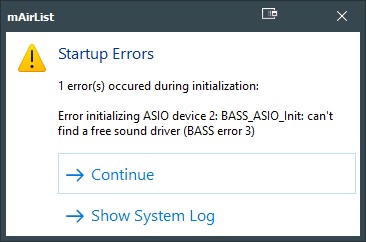

How do I fix this?
Suddenly I started getting this error on MailList startup for no reason.
I have not changed anything.
I do not use ASIO for anything.
How do I fix this?
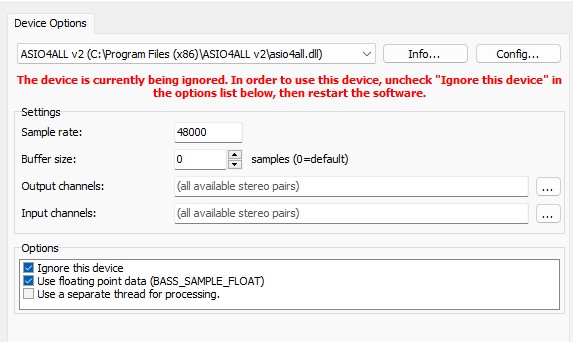
Puh - Den Fehler hatte ich selber noch nicht, aber auf Anhieb was auffällt ist vielleicht die Sample Rate auf 44100 zu ändern, hat damit zwar nicht viel zu tun und das andere was mir ins Auge fällt ist der Harken bei Options, bei Ignore this device vielleicht mal zu entfernen und dann noch einmal zu testen, ob es klappt.
Du kannst auch auf andere Antworten warten, falls du auf Nummer sicher gehen möchtest.
OS update recently? I. e. your customary sound devices are fine?
Sometimes the Devices are swapping in the Audio Routing Manager while the “Standart Device” (for Main Use) is changed or the driver was Updated. (that comes with the Windows Update)
Make shure that no other Audiodevice at the Routing Manager is selected as the right Soudcard you are normaly use.
I prefer on the first options who named “Standart Device” to select no Audiodevice. Or no Playback? I dont know how the right listet point in english.
Take a look or better share are Screenshot 
[OT]
Please use the correct expression:
“Make sure” is an expression that means to confirm or to check that things are the way they should be, or that people do what they should do. We’ve all been in situations where something went wrong because somebody - maybe even you - somebody didn’t confirm a detail; somebody didn’t think ahead; somebody didn’t do what they needed to do. Somebody didn’t make sure.
Misunderstanding:
Shure Inc. is an audio products corporation headquartered in the United States.
(…)
The company became a manufacturer of consumer and professional audio-electronics including microphones, wireless microphone systems, phonograph cartridges, discussion systems, mixers, and digital signal processing. The company also manufactures listening products, including headphones, high-end earphones, and personal monitor systems.
Thank you. 
[/OT]
This is a new feature introduced in version 7.0. Torben created a fallback option for when a device is no longer applicable or the connection has been lost for any reason.
Version 7.0-beta Build 5000 (2022-02-04)
(...)
[+] Redesigned Audio Routing configuration with improved identification/testing
    and built-in repair function when device IDs change after Windows update
(...)
[+] WASAPI: New "Windows Default Device" setting; will automatically follow
    when you switch to a different device in Windows sound settings
[+] WASAPI: Automatic recovery when devices are disconnected and reconnected
[+] WASAPI: Newly connected devices can be used without restarting the software
(...)
You see, there could be many reasons for this behaviour.
On the other hand, if this message didn’t appear before, why should it appear suddenly now?
The device is available – see the screenshot of the device path.
Community: Could the device become active automatically when Windows sets it as the standard device? 
Well, it’s no surprise if Windows Update is messing things up. It seems to do this all the time. MS is so annoying. I wish MairList had something to help in a situation like this
I changed the device in the ASIO part of Mairlist to something else, but there is no clear indication if it worked or what the setting is. I hope/wish v8 of Mairlist can improve on this somewhat.
… or have a Linux edition anyway. 

Okay, but it is a fact that you have ASIO4ALL installed as a device (the .dll in the C:\Program Files (x86)\ASIO4ALL v2\ directory / folder).
The ‘Ignore the device’ option is selected, but the error message recommends unselecting it.
From my point of view, one of the devices has been lost and the fallback option selected ASIO4ALL because it was the new Windows standard device.
This caused a conflict with the “Ignore” option.
Accepted.
However, the asio4all.dll file is still present in your system and it seems that the Windows sound control panel (not the mAirList control panel) has selected ASIO4ALL as the standard device.
mAirList selected the Windows standard device because it lost the previous device. The error message was therefore the logical consequence.
What are your thoughts on this theory?
Well, this is already available in v7. Take a look at the ‘Auto repair’ function in the audio routing of the configuration. I think this is what you are looking for.
UliNobbe, I understand what you are saying. It seems to make sense. There are no errors in the mairlist control panel/audio/routing devices though.
These settings in mairlist are a bit confusing and provide no clues or feedback on how to set up etc… which makes it difficult to understand. I don’t even know how to explain it. So it’s all good. Thank you.